
As part of dotSec’s testing and assessment line of work, we undertake Red Teaming and EDR-evasion tests. In order to test EDR properly, we need to understand how to bypass it.
This article documents practical methods for getting a SharpC2 .NET drone executable past Microsoft Defender by carefully applying obfuscation with ConfuserEx2, and it also includes a section that describes how to protect against similar, malicious attacks.
After an initial approach triggered static detections such as BluntC2 and Wacatac ML due to high-entropy resource protection, the strategy shifted to obfuscating the drone.dll before embedding it and excluding reflection-dependent classes.
Ultimately, using only rename obfuscation on drone.dll provided a functional bypass.
The exercise highlights the importance of entropy management, reflection-aware exclusions, and minimal evasive features when testing endpoint detection.
SharpC2 is an open-source (.NET based) command-and-control framework developed by RastaMouse. The main component of SharpC2 is the TeamServer (and related .NET rich client) which is responsible for both generating implants (called drones in SharpC2 parlance) as well as communicating with said implants when they are deployed to the target. SharpC2 contains a rich feature set including SOCKS and reverse port-forwarding making it very useful for red-team engagements.
We won’t go into the details of building and configuring SharpC2 as the docs are excellent. Using SharpC2 is quite simple with the rich client.
To generate an implant, one first needs to create a handler which defines the protocol (such as HTTP, SMB or TCP) and connection parameters that the implant will use to connect to the TeamServer.
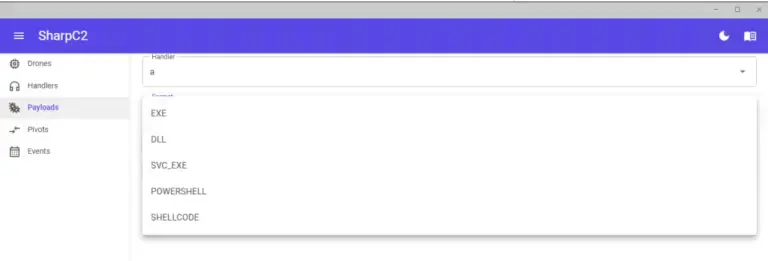
Once you have created a handler you can then create a payload which will communicate using that handler. You can create a number of different payload types including (.NET) .exe and .dll files, powershell script or just raw shellcode (the shellcode is generated via Donut).
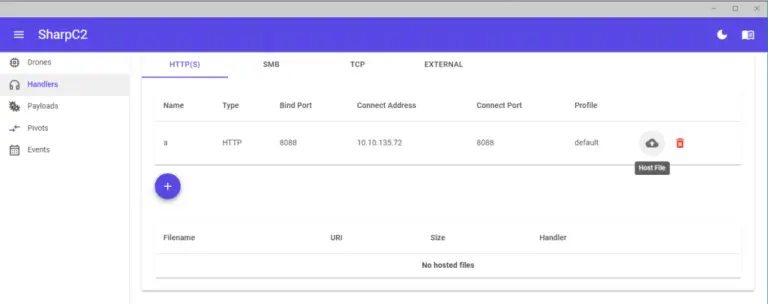
Once you’ve generated your payload (e.g. a .exe file) and deployed it to the target you’re all ready to start running remote commands. However on a machine with Windows Defender running, you’ll find that this is what will happen:
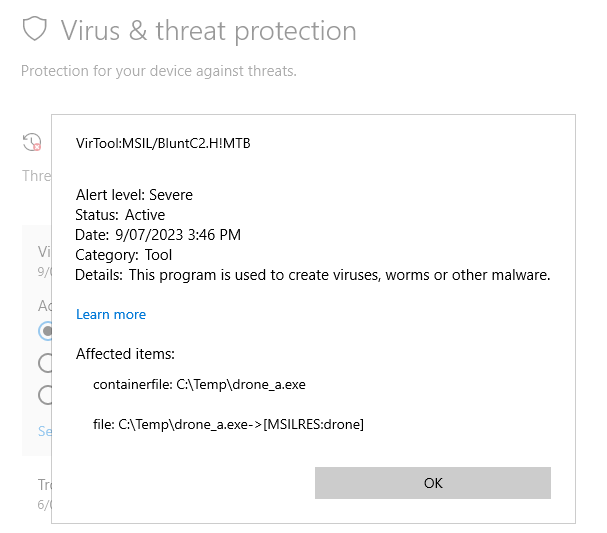
In the image above this SharpC2 payload is getting detected by Microsoft Defender as BluntC2… close, but no cigar!
Blunt or not, our goal is to get past that pesky endpoint security and so the remainder of this article will detail some strategies to bypass these detections against Defender for the .exe type payload. While .exe payloads themselves would rarely be used for initial access (as it is usually too difficult to get past the inherent defences of Mark-of-the-Web and Smartscreen using such a file format), they could well be used for persistence and it therefore instructive to see how to perform a bypass.
And in case you’re wondering why we do all this, it’s simple: We need to understand how attackers work, and we need to give clients realistic information (not gee-whiz marketing hype) on the effectiveness of endpoint detection, either as part of a red-teaming exercise or as part of a general advisory service. Knowledge is key!
Let’s see if we can use .NET obfuscation to try to bypass this static detection. The tool we will use is ConfuserEx2. To begin we note that SharpC2 uses .NET Reflection in a number of different places when constructing and executing payloads, so naively applying obfuscation to the executable produced above will result in a non-functional drone. We therefore need to identify the classes where reflection is used and exclude them from obfuscation.
The SharpC2 Visual Studio solution consists of a number of projects, but the main ones we need to concern ourselves with are:
To understand what parts we need to exclude from obfuscation we need to understand how payloads are generated and executed. After the Drone project is built the output drone.dll is copied to the SharpC2\TeamServer\Resourcesfolder. Upon compiling the TeamServer project, drone.dll gets embedded into a TeamServer dll. When the time comes to create a payload the TeamServer\Services\PayloadService.cs class performs the following operations:
The entry point for the drone is the exe_stager.exe payload which basically just gets the embedded drone.dll and reflectively calls the Execute method in its Drone.Program class:
					public static async Task Main(string[] args)
    {
        var bytes = await GetEmbeddedResource("drone");
        var asm = Assembly.Load(bytes);

        var task = (Task)asm.GetType("Drone.Program")!.GetMethod("Execute")!.Invoke(null, Array.Empty<object>());
        await task;
    }
Note that we are only interested in HTTP handlers in this post – if you want to do the same for other handler types you’ll need to exclude their associated CommModules from obfuscation.
To exclude a class from being obfuscated with ConfuserEx2, you can either use settings defined in an xml-based .crproj file, or more simply through declarative code annotations:
					namespace Drone.CommModules;

[System.Reflection.ObfuscationAttribute(Exclude = true, ApplyToMembers = true)]
public class HttpCommModule : EgressCommModule
Once these code attributes have been applied to the classes mentioned above and the relevant projects re-compiled, you can then re-generate your drone .exe payload and apply obfuscation. The easiest way to do this is using the ConfuserEx2 GUI (obtained from the releases page).
Once you define the base directory and add the drone exe to the list of modules to be obfuscated, you can edit the rule and use the preset ‘Normal’ level of obfuscation.
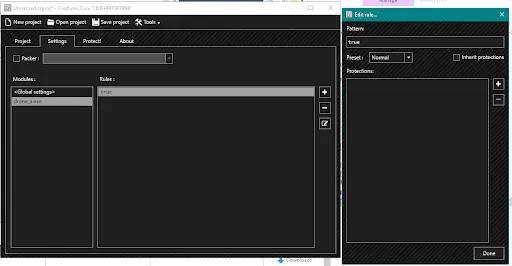
Now that you have your obfuscated executable you need to check to make sure it is still functional and that the protections such as class/method renaming or control flow obfuscation has not broken anything – this can be done on any machine without EDR installed. The exclusions described above are sufficient to ensure that the drone still works after obfuscation, so now we are ready to run it on a machine with Microsoft Defender running:
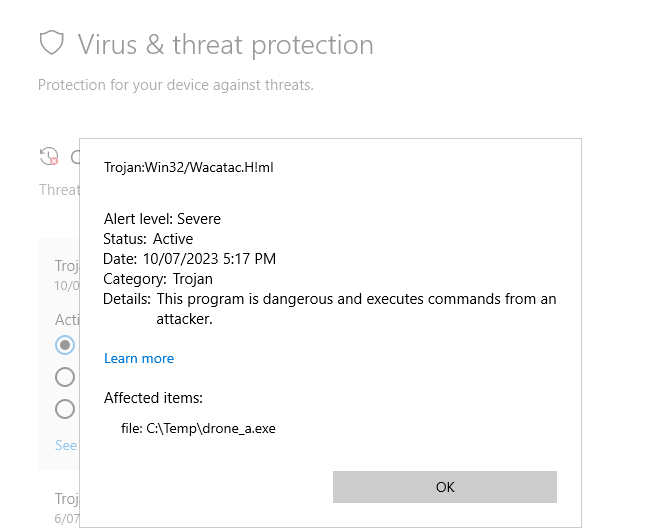
Ah – the dreaded Wacatac Machine Learning detection !
Based on experience, the Wacatac ML detections usually appear for executables with high entropy. Running SigCheck on this file confirms that finding:
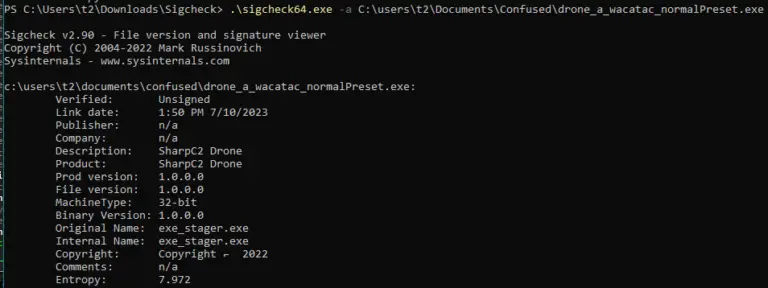
A entropy value of 7.972 is close to the maximum value (8.0) so the Wacatac detection is not surprising. Can we modify the obfuscation process so that we don’t get such a high entropy value for the final executable?
To understand if that’s possible and what we need to do, let’s have a look at the unobfuscated and obfuscated versions of the drone in dotPeek: The unobfuscated version appears pretty much the same as it is described above:
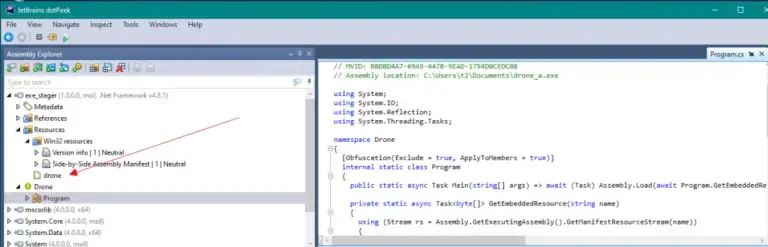
The executable contains a simple Program entry class which loads the embedded resource drone.dll.
In the obfuscated version however, the embedded drone.dll resource has gone, replaced by a strange class called <Module>.
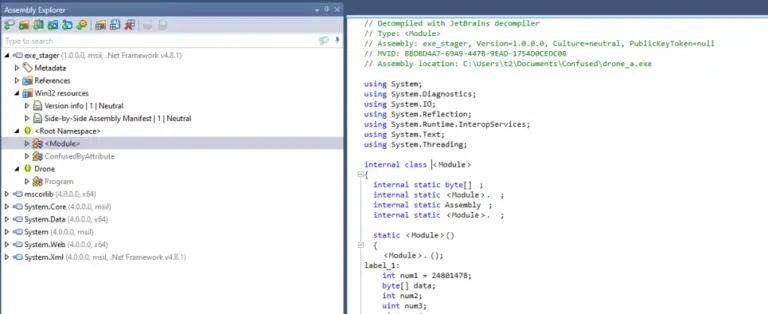
Digging into this class shows a large uint array which contains the drone.dll in some obfuscated/compressed form. What is actually happening is the ‘Resources’ protection mechanism in ConfuserEx2 has been applied, and this protection will take embedded resources in the original file and apply compression and then encryption to them. The resulting obfuscated code will definitely have a high entropy value after those processes have been applied.
So how do we avoid this?
With the default structure of the drone (a simple Assembly.Load and reflective execution of an embedded dll) the existing protections of ConfuserEx2 are not flexible enough: for embedded resources we only have the ability to either apply Resources Protection (which will just compress/encrypt that resource, resulting in Wacatac detection) or not (which will leave an unobfuscated drone.dll, resulting in a BluntC2 detection).
With the (self-imposed) constraint of not wanting to make significant code changes and just relying on obfuscation to bypass Defender we next try the following strategy: we’ll obfuscate the drone.dll first before embedding into the stager.exe wrapper – this will give us additional flexibility on how the embedded drone.dll is obfuscated. So the process of building the executable will be:
The reason why we excluded the classes HttpCommModule, Config and Crypto from obfuscation was so that when the new obfuscated drone.dll was used to create a new stager.exe in PayloadService, those bytecode manipulations described above would not break.
Once we’ve confirmed that the resulting drone is still functional, we copy it to a location with Defender enabled and …. success ! Kind of. The drone checks in once, but then a runtime behavioural detection kicks in:
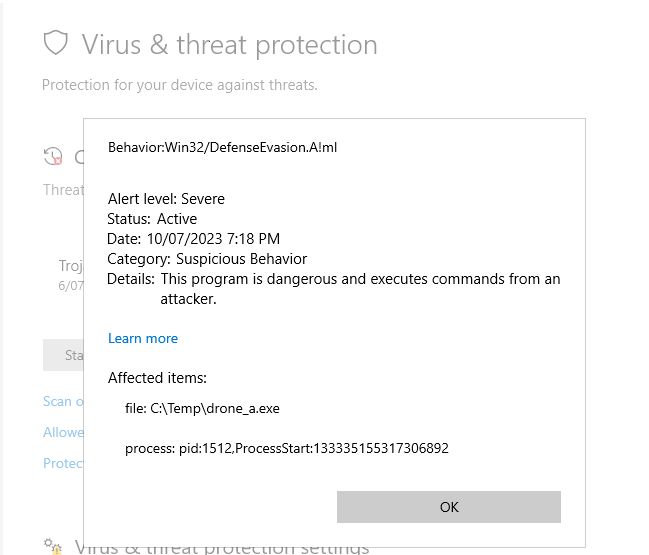
So, what went wrong this time?
The entropy of the .exe file was 7.1 which was low enough to prevent a static detection. According to the Defender documentation these behavioural detections are named after the associated MITRE ATT&CK Matrix for Enterprise techniques. The techniques for DefenseEvasion cover a lot of the protections performed by ConfuserEx2.
So to bypass this runtime detection we could potentially remove individual protections one-by-one and see which is the culprit.
As noted by others with regards to defence evasion, sometimes less is more. Rather than trying to identify which specific protection to remove, we start with the opposite approach: start with nothing and add individual protections until nothing triggers.
We end up identifying the rename protection as being sufficient.
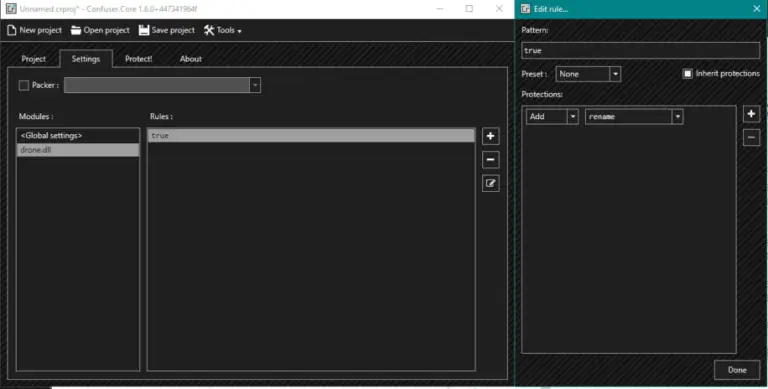
Obfuscating drone.dll with the above settings, recompiling TeamServer and then generating the .exe as described above gave us what we were after: A shiny new implant which was able to bypasses Defender.
In this article we attempted to bypass a common EDR (Microsoft Defender) using a .NET-based implant generated by the SharpC2 command and control framework. This was done by using the ConfuserEx2 tool to apply obfuscation techniques. We observed that we needed to be careful when .NET reflection is in use by excluding certain classes from the obfuscation process. And that the structure of the implant (embedded dll resources) will guide how that obfuscation should occur.
While basic Defender may not be the most advanced EDR on the market it’s probably the most widely deployed due to its default inclusion as part of the Windows operating system. Would the above obfuscation techniques be sufficient to get past a more advanced EDR such as SentinelOne or CrowdStrike ?
Well, that’s a story for another blog post! Stay tuned!
Answer: SharpC2 is an open-source, .NET-based command-and-control framework by RastaMouse. Operators configure a handler in the TeamServer and generate a payload such as an EXE, DLL, PowerShell script, or shellcode. For EXE payloads, a stager embeds drone.dll and reflectively loads and invokes Drone.Program.Execute at runtime. The TeamServer also customises the embedded DLL by inserting handler details, an AES key, and configuration values.
Answer: The unobfuscated EXE with an embedded drone.dll was detected as BluntC2 by Defender’s static signatures. When ConfuserEx2’s Normal preset was applied to the EXE, its Resources protection compressed and encrypted the embedded DLL, creating very high entropy. That entropy aligned with Defender’s Wacatac ML heuristics, triggering a machine-learning-based detection.
Answer: SharpC2 relies heavily on .NET reflection and runtime bytecode modification. Obfuscating reflection-dependent or dynamically modified classes breaks the payload. Classes such as Drone.Program, Drone.Config, Drone.Crypto, and Drone.CommModules.HttpCommModule were excluded so that reflective loading and TeamServer modifications would continue to function.
Answer: Instead of obfuscating the EXE, the authors obfuscated drone.dll first and then embedded it into the EXE. This reduced the final executable’s entropy and avoided static Wacatac ML detection. However, Defender raised a behavioural detection related to Defence Evasion techniques, likely due to multiple obfuscation features matching MITRE ATT&CK patterns.
Answer: Using only rename obfuscation on drone.dll provided a working bypass in this test scenario. The main lessons were to keep entropy low, respect reflection by excluding sensitive classes, and adopt a minimal approach to obfuscation to reduce behavioural flags.
[SharpC2] https://github.com/rasta-mouse/SharpC2
[ReadTheDocs] https://sharpc2.readthedocs.io/en/latest/
[Donut] https://github.com/TheWover/donut
[ConfuserEx2] https://github.com/mkaring/ConfuserEx/wiki/Documentation and also https://github.com/mkaring/ConfuserEx/issues/64 for a useful description of the protections.
[Exclude] While not strictly necessary, we exclude obfuscation for the entire class along with members rather than just preventing renaming.
[Releases] https://github.com/mkaring/ConfuserEx/releases/tag/v1.6.0
[Preset] https://github.com/mkaring/ConfuserEx/issues/450
[SigCheck] https://learn.microsoft.com/en-us/sysinternals/downloads/sigcheck
[dotPeek] https://www.jetbrains.com/decompiler/
[ResourcesProtection] https://github.com/mkaring/ConfuserEx/wiki/Resources-Protection
Practical and experienced Australian ISO 27001 and ISMS consulting services. We will help you to establish, implement and maintain an effective information security management system (ISMS).
dotSec’s penetration tests are conducted by experienced, Australian testers who understand real-world attacks and secure-system development. Clear, actionable recommendations, every time.
dotSec stands out among other PCI DSS companies in Australia: We are not only a PCI QSA company, we are a PCI DSS-compliant service provider so we have first-hand compliance experience.
Web Application Firewalls (WAFs) are critical, protecting web apps and services by inspecting and filtering malicious requests before they reach your servers. Web page or API, a WAF is your first defence.
Multi-Factor Authentication (MFA) and Single Sign-On (SSO) reduce password risks, simplify access, letting verified and authorised users reach sensitive systems, services and apps.
dotSec provides comprehensive vulnerability management services. As part of this service, we analyse findings in the context of your specific environment, priorities and threat landscape.
We don’t just test whether users will click a suspicious link — we also run exercises, simulating phishing attacks that are capable of bypassing multi-factor authentication (MFA) protections.
dotSec’s penetration testing services help you identify and reduce technical security risks across your applications, cloud services and internal networks. Clear, actionable recommendations, every time!
dotSec has provided Australian managed SOC, SIEM and EDR services for 15 years. PCI DSS-compliant and ISO 27001-certified. Advanced log analytics, threat detection and expert investigation services.
We provide prioritised, practical guidance on how to implement secure configurations properly. Choose from automated deployment via Intune for Windows, Ansible for Linux or Cloud Formation for AWS.
Secure web hosting is fundamental to protecting online assets and customer data. We have over a decade of AWS experience providing highly secure, scalable, and reliable cloud infrastructure.
dotSec helps organisations to benefit from the ACSC Essential Eight by assessing maturity levels, applying practical security controls, assessing compliance, and improving resilience against attacks.
Evaluation against the CIS 18 Controls establishes a clear baseline for stakeholders, supporting evidence-based planning, budgeting, maturity-improvement and compliance decisions
We have over 25 years of cyber security experience, providing practical risk-based guidance, advisory and CISO services to a wide range of public and private organisations across Australia.