This blog post is a result of our investigation into the process that attackers use when sideloading malicious DLLs into .NET executables. We’ll describe how and under what circumstances an attacker can get a malicious .NET DLL to be loaded by a trusted (signed) .NET executable, and we’ll also describe some risk-mitigation strategies for you to consider.
There’s a lot to get through (quite a few months of work was done in the lead-up to this post) so we’ll break the post into two parts; this is part one and you’ll find part 2 here.
In summary:
What’s this all about? Read on! We have animated demos and everything!
The search order for loading .NET DLLs by .NET executables is quite different from its native counterpart. To summarise, the following locations are searched, when loading .NET DLLs, in the order below:
We will ignore the GAC for this article as the requirements to place a DLL in the GAC are quite restrictive (e.g. it must be done with local administrative rights), and instead we’ll focus on the latter two locations in an attempt to find DLL sideloading opportunities that can be used when targeting an unprivileged user.
Since the application base directory is included as part of the default search path, if an application does not have a <codebase> element in its configuration file (or doesn’t have an app-specific config file at all) then it sounds like we could just place a malicious dependent-upon DLL in the same directory as the target application and it would be loaded by the target .exe. However, many .NET assemblies are strong-name signed, which can potentially make this approach impossible.
But before clarifying this, let’s discuss what makes a strong-name assembly.
A Portable Executable (PE) file is a structured binary format that Windows uses to load and execute .exe (native or .NET) and .dll files.
Strong-name signing is a cryptographic mechanism in .NET used to uniquely identify an assembly and ensure its integrity. It involves:
Now, it’s important to note that strong-name signing is different from Authenticode signing in several ways:
Of the previous three points, the last point is crucial because strong-name signing does NOT imply trust:

Well, you were warned!
When you strong-name sign a .NET assembly, you get a “strong-named” assembly. So how are strong-name signatures related to .NET assembly loading? When an application references a dependent assembly, it uses the following metadata to locate the correct file:
The reference to the public key token is what prevents strong-name assemblies from being tampered with. If an attacker wants their malicious .NET DLL to be loaded in place of the legitimate strong-name, signed DLL, then they need to have it signed by the private key associated with the advertised public key token. Of course, the attacker doesn’t have that signing key and so signature validation will fail.
As an aside: There is also the possibility of an attacker being able to create a valid strong-name signature with a different public/private key pair, but with a clashing SHA1 hash of the advertised public key which will also let the malicious DLL load, but this is obviously a very non-trivial challenge!
What if the assembly is not strong-name signed ? After all, developers have the choice as to whether or not to strong-name sign their assemblies. In that case, the public key token is null and not used to determine the version of the DLL to be loaded, and so sideloading is trivial. However, it appears that all of the core Microsoft .NET Framework DLLs are strong-name signed, so this makes them immune to undetectable tampering.
Having said all of the above, in 2008 Microsoft released an update to .NET 3.5 Service Pack 1 which under certain conditions disabled verification of strong-name signature during assembly loading for performance reasons.
What conditions? All of the following:
There is a bit to unpack there and a complete understanding of these conditions requires historical knowledge of Code Access Security (CAS) and how it changed from .NET 2.0 -> 4.0. For the interested reader, we recommend the series of blog posts from 2008 which describe the evolution of CAS, .NET sandboxing and strong-name signature verification, much better than the official documentation.
The most common case where the conditions in the previous bullet-list are satisfied is when a standalone (not hosted in a process such as ASP.NET or Click-once as they typically use application domains which are not full-trust) executable and its dependent DLL are located in the same directory on a local machine, then strong-name signatures are not verified when running under .NET Framework >= 3.5 SP1 (which is deployed pretty much everywhere). So, in a sense, in such a scenario all .NET DLLs can be sideloaded.
What about an attacker who wants to load their malicious DLL from a remote server ? Will strong-name signatures be verified in such a case ? To test this out, assume we have a .NET executable executable.exe with a dependency dependency.dll, both strong-name signed. First, we use DNSpy to modify dependency.dll to break the strong-name signature:
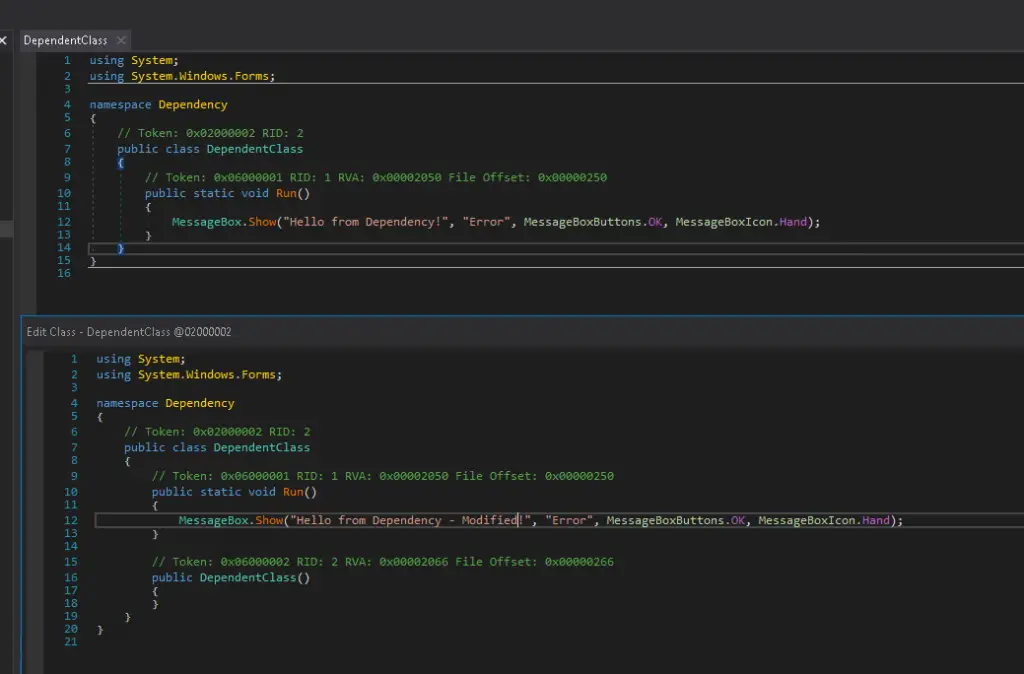
Running DNSpy
Now, recompile from within DNSpy and confirm using the strong-name tool (sn.exe) that the strong-name signature of the modified DLL now fails validation:
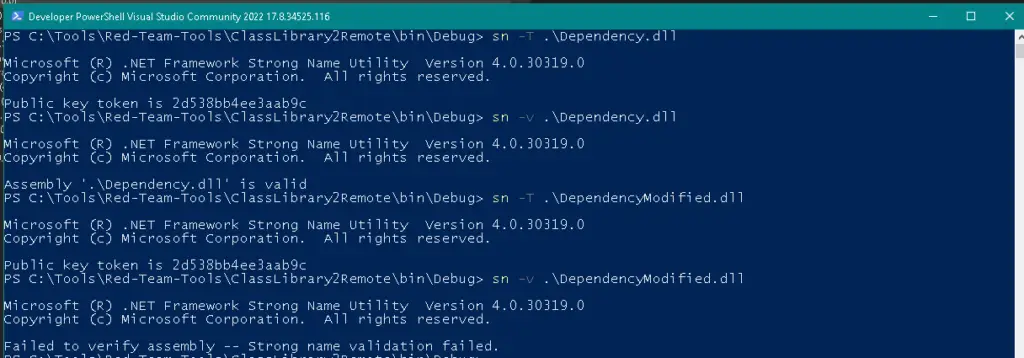
Success! Failed signature validation
First note that if we host the modified dependency.dll on a remote HTTP(S) server, adjust the codebase to point to that remote server, and then attempt to execute executable.exe, we fail:
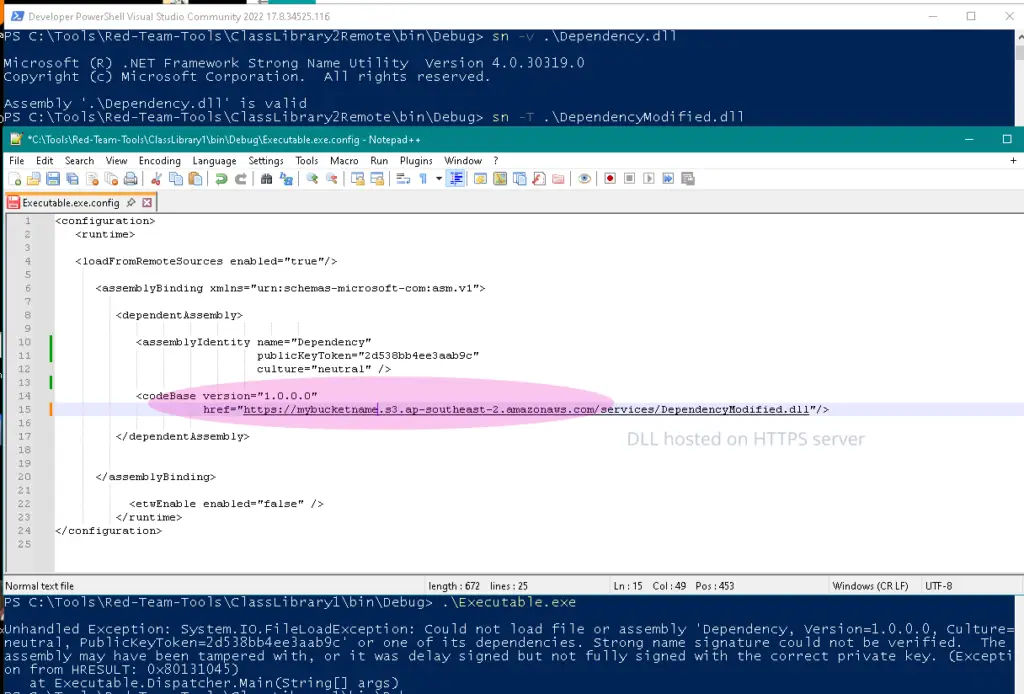
Serving up over HTTPS won’t work.
As shown above, strong-name signatures are indeed being verified for remote DLLs loaded over HTTP(S).
However as a comparison, if we host the modified dependency.dll on a remote WebDAV server, adjust the codebase property to point to that URL and run executable.exe locally, we see that the modified dependency.dll is loaded/executed successfully:
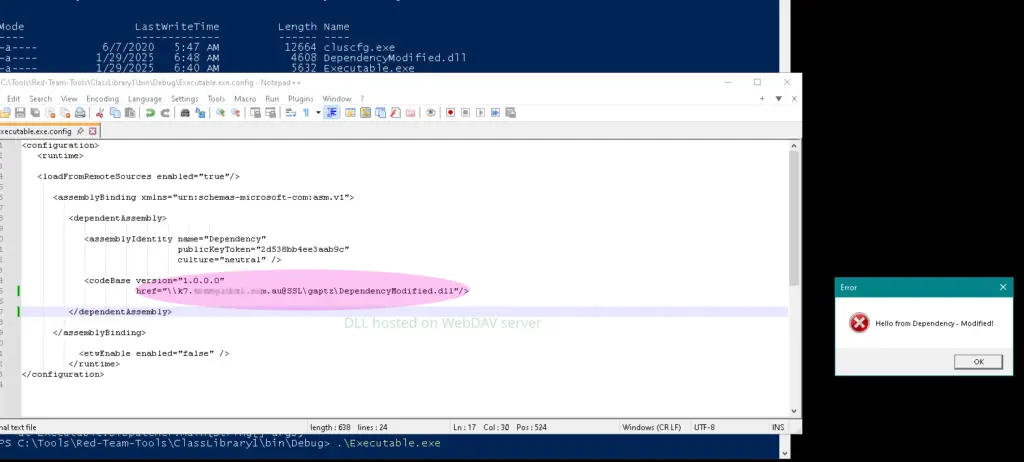
But WebDAV? DLL-loading happiness!
Since this DLL is not being loaded from a location under the ApplicationBase property of the default AppDomain, this does seem to be inconsistent with the conditions for the strong-name validation bypass described above (and may be a Microsoft bug?).
PE files (like .exe and .dll) are most vulnerable to abuse (e.g., malware, unwanted code execution) and so Microsoft came up with Mark of the Web (MotW), a flag stored inside the file’s alternate data stream (ADS) on NTFS file systems. This flag tells Windows and other software (including browsers, PowerShell, .NET runtimes, etc.) that the file in question came from the Internet (an untrusted zone).
In the context of this post, it’s worth noting that the presence or absence of the MOTW on an executable (or DLL dependency) does not affect the conditions of the strong-name signature bypass: That is, if an executable and DLL dependency have the MOTW and they would normally be permitted to execute by Smart Screen (e.g. if they were a Microsoft-signed executable) then strong-name signatures are still not validated by default.
In our investigation into DLL sideloading for .NET executables, we explored how attackers might load malicious .NET DLLs using trusted, signed .NET executables. The process for loading .NET DLLs differs significantly from native executables, with the search order prioritizing the Global Assembly Cache (GAC),locations specified by the `<codebase>` element in configuration files, and the current application base directory.
In conclusion (and Part 2 will be here next fortnight!) we describe:
Part 1 of this investigation has underscored the importance of understanding .NET’s assembly loading mechanisms and potential vulnerabilities, emphasizing the need for robust security practices in application development and deployment.
Part 2 is done now so you can read on and see how we look at performing .NET sideloading of legitimate Authenticode-signed executables.
See you there!!
Practical and experienced Australian ISO 27001 and ISMS consulting services. We will help you to establish, implement and maintain an effective information security management system (ISMS).
dotSec’s penetration tests are conducted by experienced, Australian testers who understand real-world attacks and secure-system development. Clear, actionable recommendations, every time.
dotSec stands out among other PCI DSS companies in Australia: We are not only a PCI QSA company, we are a PCI DSS-compliant service provider so we have first-hand compliance experience.
Web Application Firewalls (WAFs) are critical, protecting web apps and services by inspecting and filtering malicious requests before they reach your servers. Web page or API, a WAF is your first defence.
Multi-Factor Authentication (MFA) and Single Sign-On (SSO) reduce password risks, simplify access, letting verified and authorised users reach sensitive systems, services and apps.
dotSec provides comprehensive vulnerability management services. As part of this service, we analyse findings in the context of your specific environment, priorities and threat landscape.
We don’t just test whether users will click a suspicious link — we also run exercises, simulating phishing attacks that are capable of bypassing multi-factor authentication (MFA) protections.
dotSec’s penetration testing services help you identify and reduce technical security risks across your applications, cloud services and internal networks. Clear, actionable recommendations, every time!
dotSec has provided Australian managed SOC, SIEM and EDR services for 15 years. PCI DSS-compliant and ISO 27001-certified. Advanced log analytics, threat detection and expert investigation services.
We provide prioritised, practical guidance on how to implement secure configurations properly. Choose from automated deployment via Intune for Windows, Ansible for Linux or Cloud Formation for AWS.
Secure web hosting is fundamental to protecting online assets and customer data. We have over a decade of AWS experience providing highly secure, scalable, and reliable cloud infrastructure.
dotSec helps organisations to benefit from the ACSC Essential Eight by assessing maturity levels, applying practical security controls, assessing compliance, and improving resilience against attacks.
Evaluation against the CIS 18 Controls establishes a clear baseline for stakeholders, supporting evidence-based planning, budgeting, maturity-improvement and compliance decisions
We have over 25 years of cyber security experience, providing practical risk-based guidance, advisory and CISO services to a wide range of public and private organisations across Australia.