
This is part two of our two-part blog post, describing our investigation into the process that attackers use when sideloading malicious DLLs into .NET executables.
Now that we know from previous work how we can bypass strong-name signature verification.
This time we want to side-load a DLL into a Microsoft-signed .NET executable; what would be the easiest way to do this ?
This is part two of our two-part blog post, describing our investigation into the process that attackers use when sideloading malicious DLLs into .NET executables. If you missed it, part one is here.
Now that we know how we can bypass strong-name signature verification, and we want to side-load a DLL into a Microsoft-signed .NET executable, what would be the easiest way to do this ? The general process one might follow is as follows:
Click the “Play” button to see steps 1 to 4 in action:
The next steps are as follows:
At this point you have a modified dependent DLL, but the re-assembly process does not re-add the original strong-name signature. To rectify this:
Your modified DLL will now be correctly loaded by the signed executable in a strong-name signature bypass scenario. Let’s go through this process with a random executable from the Visual Studio distribution: T4VSHostProcess.exe. This Microsoft-signed .NET executable does….. actually I have no idea what it does! But fortunately, for the process of loading “malware” it doesn’t matter. As shown in the video above, you can see:
The assembly Microsoft.VisualStudio.TextTemplating.VSHost.dll contains the class:
Microsoft.VisualStudio.TextTemplating.VSHost.TransformationRunFactoryWe can now disassemble the DLL using:
ildasm.exe Microsoft.VisualStudio.TextTemplating.VSHost.dll /out=myfile.il
Then we search for method signature RegisterIpcChannel(string portName) and add our ‘malicious code’… which in this case just:
‘System.Console.WriteLine(“HelloWorld”)’
… not too evil!
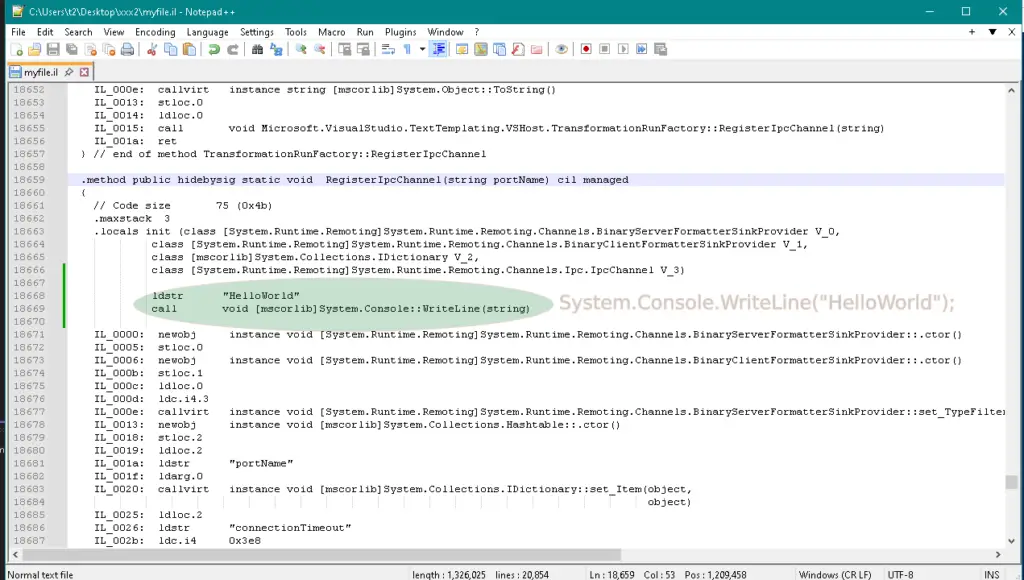
We then re-assemble to a DLL with this command:
ilasm.exe /DLL /OUTPUT=Microsoft.VisualStudio.TextTemplating.VSHost.dll .\myfile.il
If you like, load it up into DNSpy and decompile to confirm your malicious code is in there:
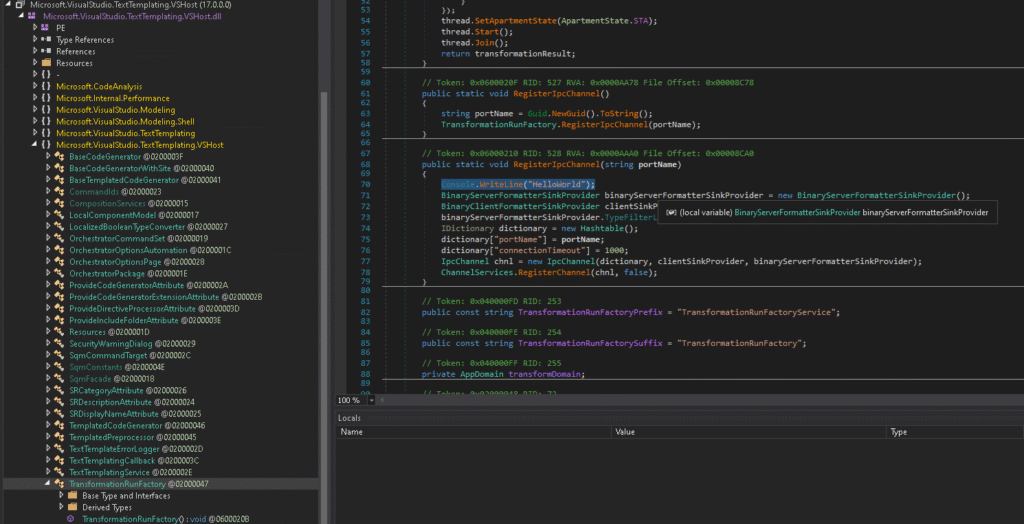
At this stage, if you attempt to run the executable with the modified DLL in the same directory, you’ll get an error message “strong-name validation failed”, as shown here:

What happened ? If you use the sn.exe tool to check the strong-name properties of the modified DLL you see the problem:

While the DLL has the correct public-key token (‘sn -T’), the runtime thinks the DLL is delay-signed (and hence the strong-name signature bypass conditions are not applicable).
To fix this, we just need to check the ‘StrongNameSigned’ attribute in the COR header of the DLL using DNSpy:
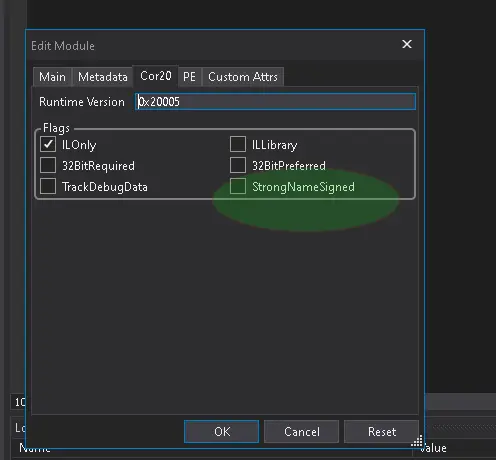
Once that’s done, save the assembly and rerun the T4VSHostProcess.exe:
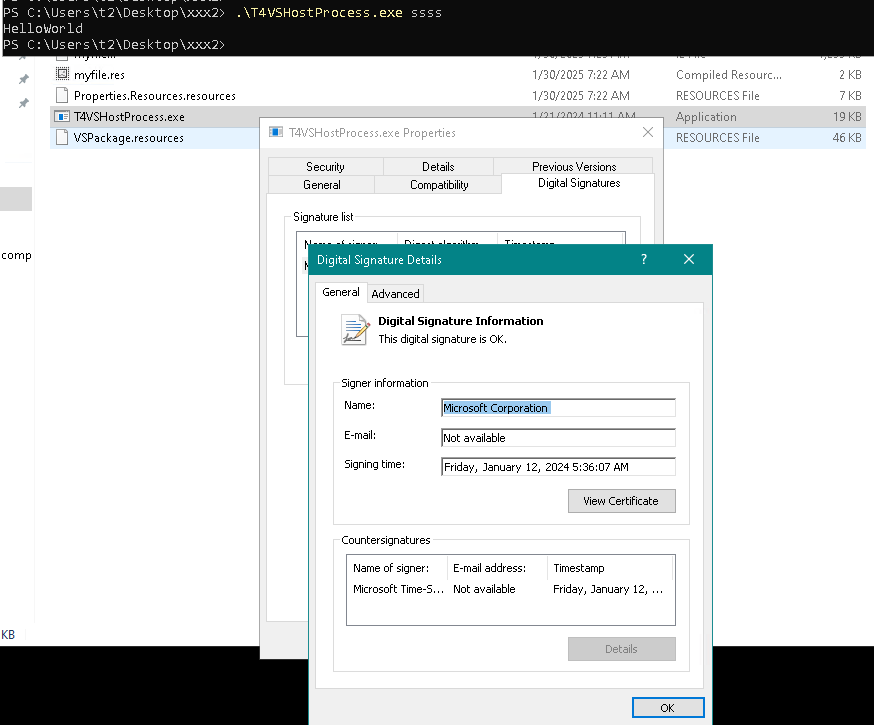
As you can see, the Microsoft-signed executable T4VSHostProcess.exe successfully loads and executes our malicious DLL.
One important thing we haven’t mentioned up until now, is this: The strong-name bypass feature can be disabled (per application or globally):
or,
Note that if the global setting is enabled, the per-configuration file setting is ignored. This allows administrators to enforce strong-name signature verification on the machine which is probably a wise policy, given how easy it is to sideload .NET DLLs.
Suppose that administrators have set the above registry key organisation-wide to enforce strong-name signature verification. After all, some compliance standards require disabling the strong-name verification bypass globally. What are the options for an attacker in such a situation?
For an malware-based attack to be successful, the attacker in this scenario will need:
A .NET DLL dependency without a strong-name signature (which can be modified by the attacker to load their malicious code). Modifying the DLL dependency will break any Authenticode signature on the file (if there is one). However, validation of DLL Authenticode signatures as part of a security control appears to be quite rare. See for example Dynamic Code Security in WDAC, which is disabled by default.
Unfortunately (for the attacker), strong-name signatures are ‘viral’ which means that a strong-name signed .NET assembly can only reference (statically) another assembly if it is also strong-name signed. And unfortunately all the core .NET assemblies are strong-name signed which means all their dependencies must be strong-name signed and hence cannot be exploited in this scenario.
However there are numerous other Authenticode-signed executables which are not strong-name signed, and which load dependencies which are also not strong-name signed.
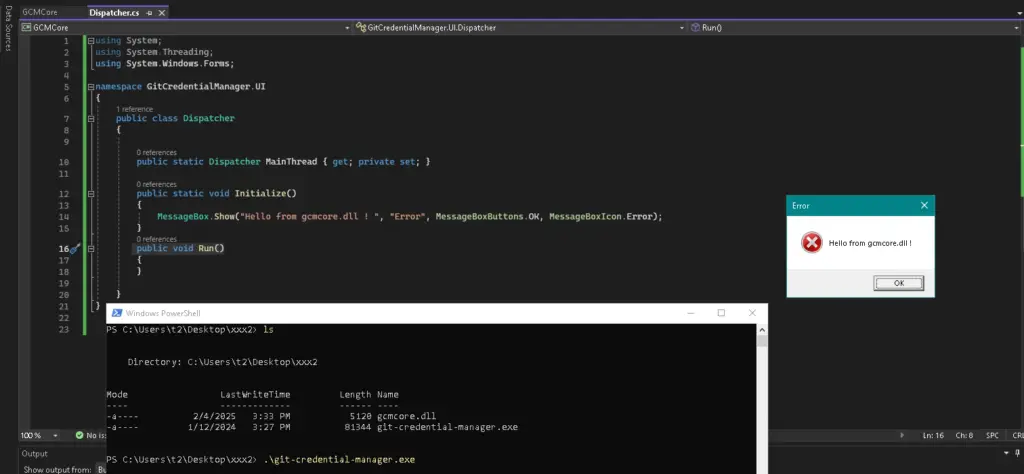
The first example we found was git-credential-manager.exe which appears in the standard Visual Studio distribution. This executable is Authenticode-signed (by github.com), not strong-name signed and has a dependency gcmcore.dll which is also not strong-name signed.
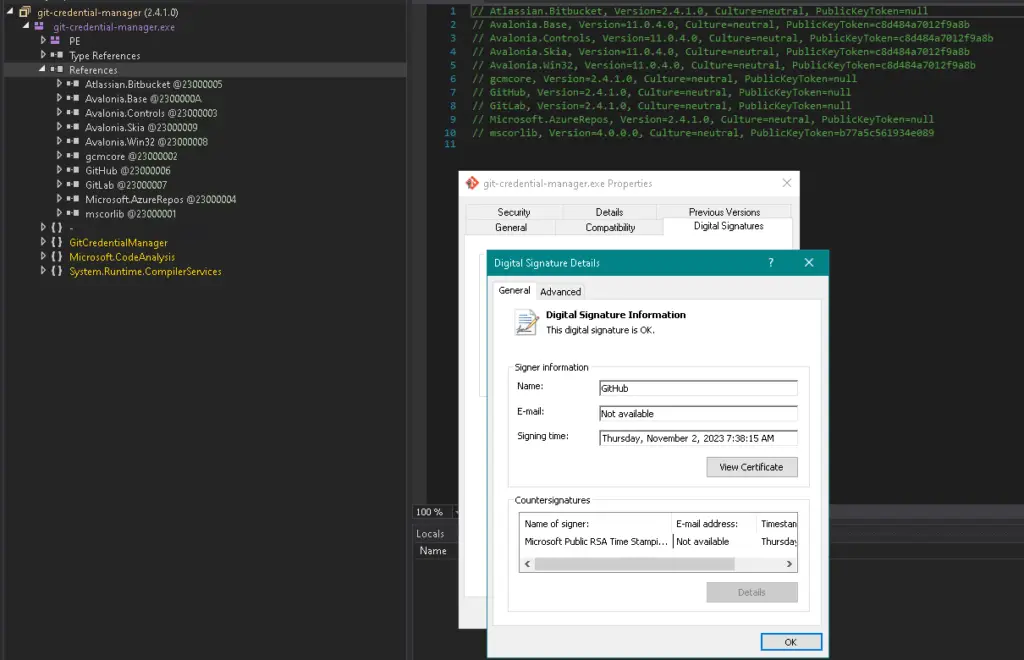
Rather than go through the disassemble/modify/reassemble process described above, we just note that the entry method in the git-credential-manager.exe file has a very simple implementation:
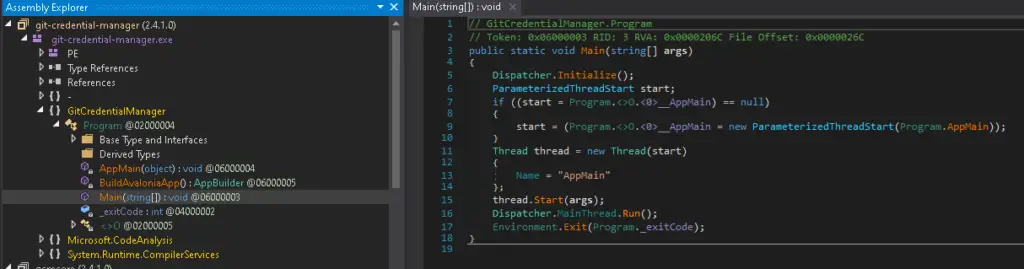
Furthermore, we only need to implement these three methods from the GitCredentialManager.UI.Dispatcher class in order to successfully sideload gcmcore.dll.
					public static Dispatcher MainThread { get; private set; }
public static void Initialize()
public void Run()
But what if we really, really want to use an Authenticode-signed (by Microsoft) .NET executable which fulfils this requirement? Why? Because Microsoft-signed binaries are inherently trusted by Windows security mechanisms, including Windows Defender SmartScreen, AppLocker & Windows Defender Application Control (WDAC), and some Endpoint Detection & Response (EDR) solutions.
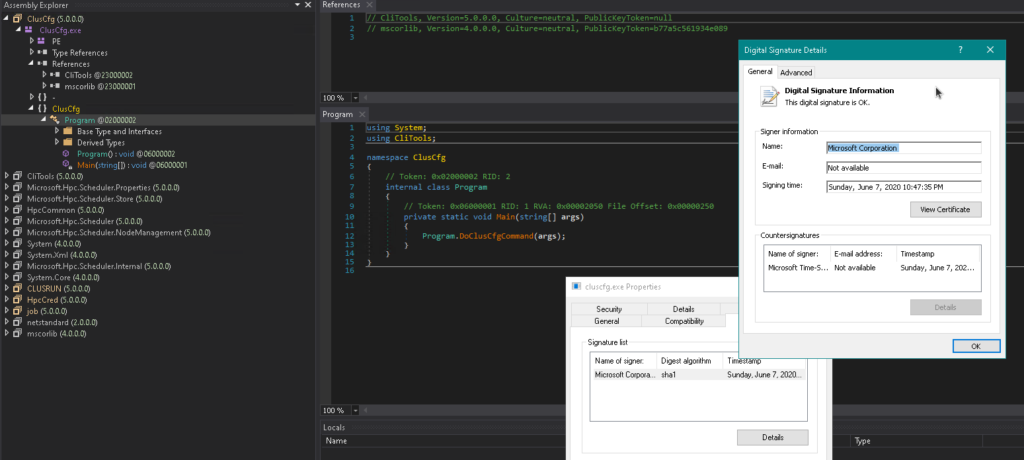
Well you’re in luck: By searching through the Microsoft downloads pages we did indeed find one, the High Performance Computing client package. This package contains a number of Authenticode-signed (by Microsoft) .NET executables including hpccred.exe, cluscfg.exe, clusrun.exe, job.exe, and more. The good news is that these executables do not have a strong-name signature, and they are dependent upon clitools.dll, which is also not strong-name signed.
These executables all have a very simple implementation. For example, cluscfg.exe has an entrypoint which just calls CliTools.Program.doClusCfgCommand(string[]), in clitools.dll:
So the steps for sideloading the DLL are pretty straightforward:
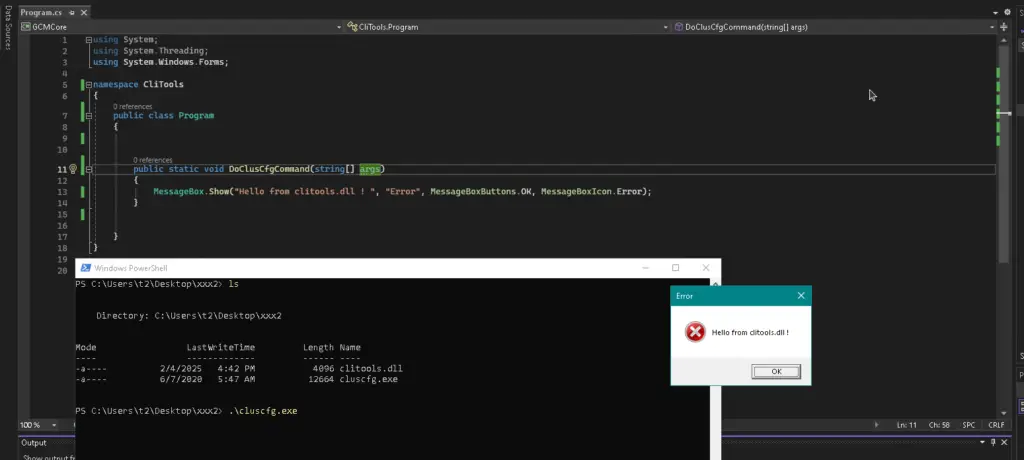
Hello-world malware!
As we have seen, sideloading .NET DLLs can be very easy when strong-name signatures are not validated, due to the simple algorithm used to search for dependencies. However, even when strong-name signature validation is enforced there are still plenty of Authenticode-signed .NET executables which are not strong-name signed which can be (ab)used for sideloading malicious code.
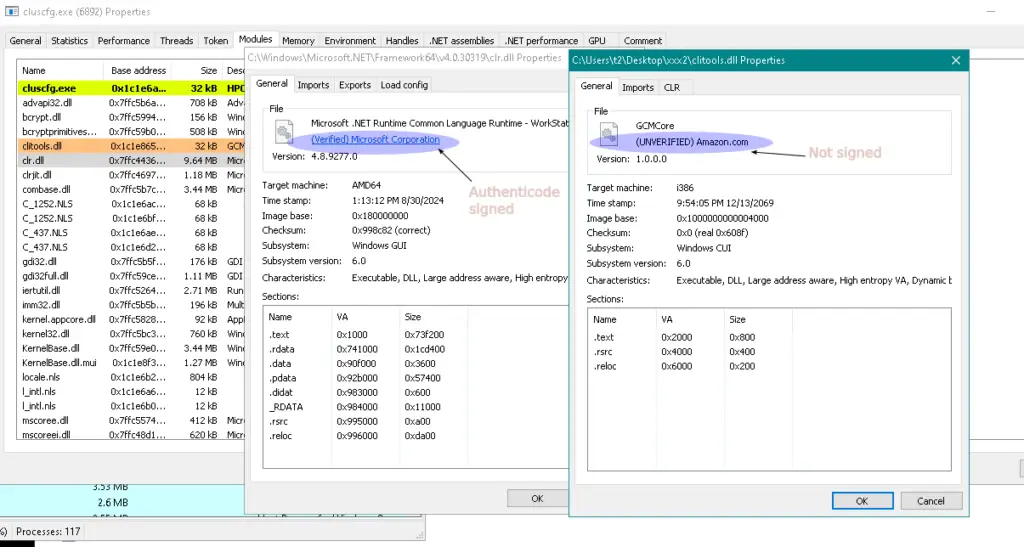
As a defence practitioner, what are your options for detecting sideloading of .NET DLLs? The obvious tell in all the examples given above is that the DLLs which were modified were originally (authenticode-)signed and modification breaks their signature. For example looking at the DLLs loaded by cluscfg.exe (from the last example) in Process Hacker, we see that clitools.dll is clearly unsigned:
In terms of practical detection and prevention, the best way forward is probably implementation of application whitelisting through a solution such as ‘Application Control for Business’ (formally WDAC).
Using the example above, attempting to run cluscfg.exe with the modified clitools.dll (with broken Authenticode signature) on a system with App Control enforcing even the moderate ‘Allow Microsoft’ base policy, execution will be prevented:
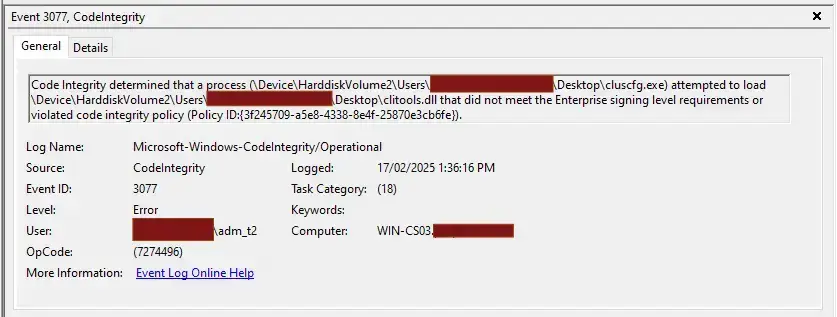
So in closing: While implementing App Control may be a non-trivial task in an Enterprise environment, it certainly does make an otherwise quite-easy life more difficult for attackers. Give us a yell if you want to know more!
Practical and experienced Australian ISO 27001 and ISMS consulting services. We will help you to establish, implement and maintain an effective information security management system (ISMS).
DotSec’s penetration tests are conducted by experienced, Australian testers who understand real-world attacks and secure-system development. Clear, actionable recommendations, every time.
dotSec stands out among other PCI DSS companies in Australia: We are not only a PCI QSA company, we are a PCI DSS-compliant service provider so we have first-hand compliance experience.
Web Application Firewalls (WAFs) are critical for protecting web applications and services, by inspecting and filtering out malicious requests before they reach your web servers. Web page or API, a WAF is your first defence.
Multi-Factor Authentication (MFA) and Single Sign-On (SSO) reduce password risks, simplify access, letting verified and authorised users reach sensitive systems, services and apps.
dotSec provides comprehensive vulnerability management services. As part of this service, we analyse findings in the context of your specific environment, priorities and threat landscape.
We don’t just test whether users will click a suspicious link — we also run exercises, simulating phishing attacks that are capable of bypassing multi-factor authentication (MFA) protections.
DotSec’s penetration testing services help you identify and reduce technical security risks across your applications, cloud services and internal networks. Clear, actionable recommendations, every time!
dotSec has provided Australian managed SOC, SIEM and EDR services for 15 years. PCI DSS-compliant and ISO 27001-certified. Advanced log analytics, threat detection and expert investigation services.
We provide prioritised, practical guidance on how to implement secure configurations properly. Choose from automated deployment via Intune for Windows, Ansible for Linux or Cloud Formation for AWS.
Secure web hosting is fundamental to protecting online assets and customer data. We have over a decade of AWS experience providing highly secure, scalable, and reliable cloud infrastructure.
DotSec helps organisations to benefit from the ACSC Essential Eight by assessing maturity levels, applying practical security controls, assessing compliance, and improving resilience against attacks.
Evaluation against the CIS 18 Controls establishes a clear baseline for stakeholders, supporting evidence-based planning, budgeting, maturity-improvement and compliance decisions
We have over 25 years of cyber security experience, providing practical risk-based guidance, advisory and CISO services to a wide range of public and private organisations across Australia.