Why your staff click spelling mistake-laden emails (and how to actually stop them)
You have done everything “right” by the book… “Cyber Awareness” training modules… posters in the lunchroom… even warning emails about the latest package-delivery scams. Yet, when the phishing simulation results come back (or worse, when a real incident report lands on your desk on a Tuesday morning) the click rates are still unacceptably high. And when it comes to users who fall for a phishing lure, studies show that the median time to click is less time than it takes to boil the kettle!! What to do? Read on!
Introduction and "that chat"
It is the conversation no CISO, IT Manager, or Business Owner wants to have.
You have done everything “right” by the book. You have rolled out the quarterly “Cyber Awareness” training modules. You have put up the posters in the lunchroom reminding people to “Stop, Look, Think.” You have sent the warning emails about the latest package-delivery scams. You might have even shamed a few repeat offenders in a private meeting.
Yet, when the phishing simulation results come back (or worse, when a real incident report lands on your desk on a Tuesday morning) the click rates are still unacceptably high.
According to the latest Netskope Threat Labs Report for Australia (August 2025), the rate of Australian workers clicking phishing links grew by 140% in the last 12 months. To put that in perspective, the click rate jumped from 0.5% in 2024, to 1.2% of all users in 2025. While 1.2% might sound small, in a company of 200 staff, that is two successful breaches every single month.
Even more alarming, the Verizon 2024 Data Breach Investigations Report indicates that for users who fall for a phishing lure, the median time to click is less than 60 seconds [2].
That means between opening the email and compromising your network, the average employee spends less time thinking than it takes to boil a kettle!
The immediate reaction from management is usually frustration, followed by a desire for punishment. “Why are they so careless? Do we need to fire someone to make a point?”
But before we start handing out written warnings, we need to stop asking “Why are they so stupid?” and start asking the engineering question: “Rather than focus on why users make mistakes, consider a more holistic question: Why do our controls fail when the mistake is made?“
The "Uber-phishing" FUD vs. the mundane reality
If you read the headlines or listen to vendor sales pitches, you would be forgiven for thinking that every successful breach is the result of a state-sponsored, AI-generated deepfake that could fool a forensic expert.
It is true that Artificial Intelligence is aggressively changing the way that large-scale and spear-phishing attacks are engineered. For example, a 2025 Harvard study found that AI-generated phishing emails achieved a click-through rate of 54%, compared to roughly 12% for traditional human-written templates [3]. That is of course a staggering difference, driven by the AI’s ability to create grammatically perfect, context-aware messages that raise fewer red flags than the scams of old.
But here is the cold, hard reality we have seen in our own SOC and SIEM logs at dotSec over the past 15 years:
You don’t need AI to hack a human! Instead, we see users clicking on mundane, “simple” attacks:
- They will click on links in emails with broken grammar and “Urgent Invoic.pdf” attachments
- They will click on links in emails that include “From:” field containing an address that is totally unrelated to the actual recipient.
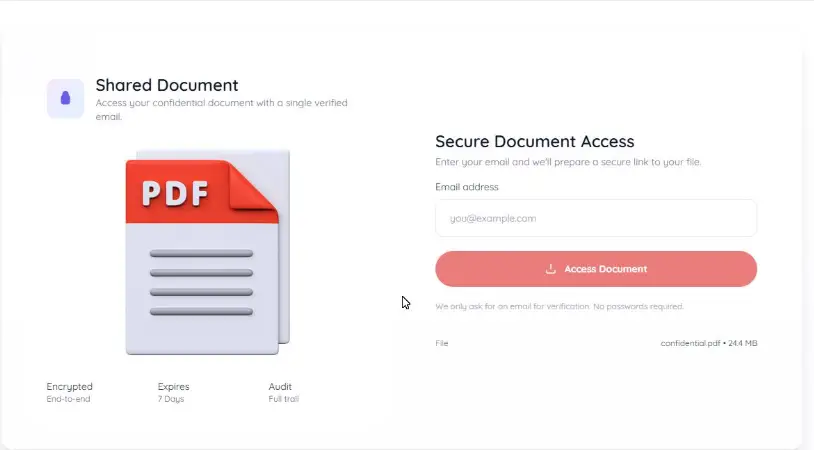
- And they will hand over their credentials to sites that look nothing like the real Microsoft 365 login page, hosted on URLs like update-microsoft-security-check.xyz.
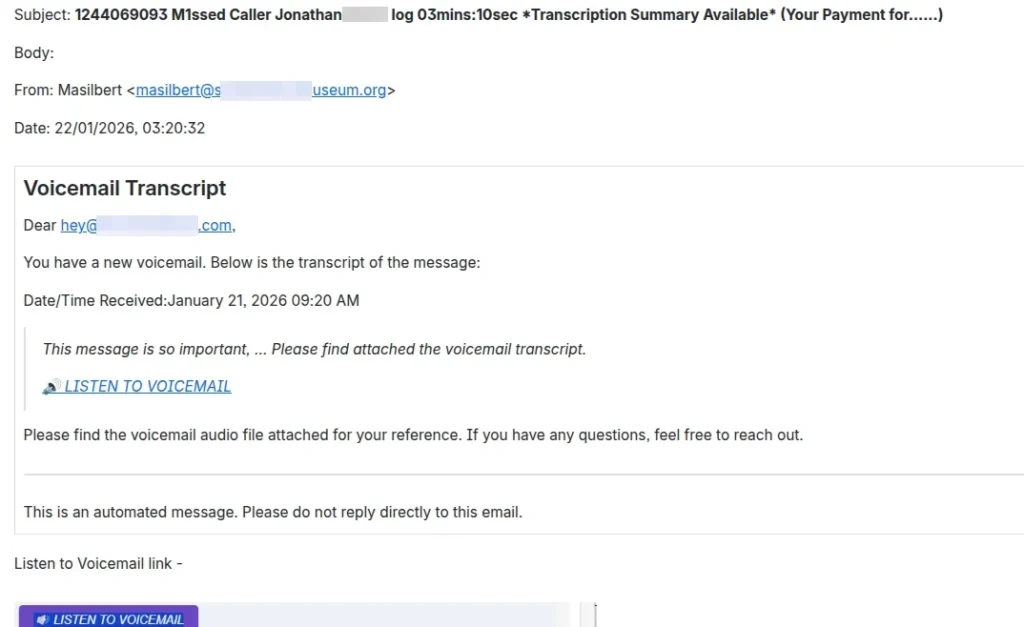
A voicemail from someone at a museum? Why? If the training works, why did that email scam work?
The Psychology of Fatigue
Your users aren’t stupid; they are fatigued.
Modern employees are processing more signals than ever before. They are clearing their inbox on a mobile screen between Zoom meetings, answering Slack messages, and trying to get actual work done. They are operating in a state of “Cognitive Economy” where the brain’s natural tendency is to save energy by using shortcuts (heuristics) rather than deep analysis.
When an email arrives with the subject line “Action Required: Overdue Invoice” or “HR: Salary Update,” the brain’s amygdala (fear/urgency centre) overrides the frontal cortex (logical analysis). The desire to resolve the conflict (“I need to pay this invoice”) happens faster than the logical check (“Is this URL legitimate?”).
Perhaps aside from aggressive electroshock therapy, no amount of training will fix, as in totally reprogram, human nature. You cannot “train” your way out of this problem any more than a car manufacturer can “train” drivers never to crash. Which is why cars have airbags!
The "Cloud Immunity" Fallacy: An aside on Business Risk
It’s at about this point that a fairly-common objection is voiced, “We don’t need all this rigorous protection; we are 100% cloud-based. Microsoft looks after our security.”
This is a dangerous misunderstanding of the “Shared Responsibility Model.” Microsoft (or your favourite, alternative SaaS provider) guarantees that their infrastructure won’t break (within limits). They do not however guarantee that your account won’t be breached or that your data won’t be deleted.
If an attacker phishes an admin account in your “secure cloud,” they can encrypt your SharePoint files or delete your backups just as easily as they could on a physical server. And here is the kicker: Restoration time. (Well, backups and restoration time… don’t forget the backups!)
You might not have physical servers to rebuild, but you absolutely have downtime to fear.
Industry data shows that the average downtime following a ransomware attack is now 24 days [4][5].
This is often due to the “data gravity” problem: even if your cloud backups are safe, restoring terabytes of data over a standard internet connection, while battling API throttling limits, is a slow, painful process.
So what to do? From hope to engineering
If we accept that users will click (and the data says they will), then our strategy must shift from solely focusing on “Prevention via Policy” (begging them not to click) to “Prevention via Engineering” (making the click irrelevant).
This is where a holistic approach changes the game. We need to implement technical guardrails that catch the user when they slip. If you assume the user will fail, you need two layers of defence that kick in automatically: the Airbag and the Vault.
1. The “Airbag”: Secure Web Gateways (SWG)
In a traditional setup, when a user clicks a link, their browser performs a DNS lookup and connects directly to the server. If that server is malicious, the user is exposed immediately. The only thing standing between your network and a compromise is the user’s ability to spot a typo in the URL.
A Secure Web Gateway (SWG), like the Cloudflare Gateway Enterprise solutions we deploy, changes this flow. It acts as a mandatory middleman for all outbound traffic. When the user clicks a link, here’s what happens:
- Inspection: The SWG pauses the request. It doesn’t just check a “black list” of known bad sites (which is often days out of date).
- Analysis: It analyses the destination in real-time. Is this a “Newly Registered Domain” (created 2 hours ago)? Does the page code contain known phishing kits? Is the site hosting an executable file?
- Verdict: If the risk score is high, the gateway blocks the connection.
If the click led to a malicious site, the user won’t see a login page; they’ll see something like a red “Page Blocked” screen. This effectively “patches” the user’s mistake before it causes harm. It allows your staff to be human without bringing down the company.
2. The “Vault”: Phishing-Resistant Authentication
Let’s say the user clicks the link, the gateway misses it (no tool is 100%), and they land on a fake Microsoft 365 login page. They type their password. And they approve the MFA push notification because they are in a rush.
In a standard MFA setup, the attacker now has the password and the session token. They are in.
This is why “MFA” is no longer enough. You need Phishing-Resistant Authentication.
Technologies like Windows Hello for Business (WHfB) and FIDO2 keys fundamentally break the phishing model through a process called “Origin Binding.” How it works:
- The key: When a user logs in with WHfB (face/fingerprint/PIN) or a FIDO2 key, the device generates a cryptographic response signed with a private key.
- The Trap: Crucially, this response includes the domain name of the site the user is currently on.
- The Result: If the user is on a fake site (e.g., fake-office365.com), the browser sends a response signed for fake-office365.com. The real Microsoft server receives this, sees the domain mismatch, and rejects the login.
The attacker cannot steal the credential because there is no password sent over the wire. Even if the user wants to be tricked (hey, c’mon, you’ve thought that must be the case with some people, right?) the mathematics of the authentication protocol prevents them from handing over the keys.
This is a core part of system hardening; configuring your environment so that the easy path is also the secure path.
So how can dotSec help?
Our 25-years of history shows that we’re not a product sales-focused business: We don’t just sell you a license and wish you luck. Instead, we’re a solutions-focused provider, and we engineer holistic, tailored outcomes that address your requirements, from proving the problem exists to fixing it permanently.
As outlined in our standard engagement model, we can help you with:
1. Audit & Reality Check
We assess your current exposure, not just by counting how many people click, but by auditing your technical ability to stop the click, and reduce the post-click risks. We review your existing email filtering, EDR, and browser policies to find the gaps that standard “health checks” miss.
2. Advanced “Adversary Simulation”
Most phishing simulations are too simple. They send a fake email and track clicks. That tests the user, not the system.
We run advanced phishing simulations using the same tools actual attackers use. We’re adept at engineering assumed-breach exercises. And we simulate Adversary-in-the-Middle (AiTM) attacks that can bypass standard MFA. This demonstrates exactly which users and which accounts are vulnerable even with standard MFA in place, giving you the undeniable evidence needed to justify the budget for FIDO2 or WHfB.
3. Engineering the Solution
We don’t just advise; we build. As detailed in our Statement of Work structure, we deploy the hard controls needed to secure your environment:
- Secure Web Gateway Implementation: We configure Cloudflare Gateway Enterprise (or your preferred vendor) to inspect and filter egress traffic, blocking threats before they load.
- Phishing-Resistant Auth: We manage the complex deployment of Windows Hello for Business and Entra ID (Azure AD) policies. We handle the “hard stuff” like the Intune configurations, the conditional access policies, and the user enrolment workflows.
- Managed Risk: If you require, we’ll integrate these tools and processes into our Managed SOC and SIEM. This means when a user gets blocked by the Gateway, our analysts see it. We can then investigate why they were targeted and tighten defences further.
The bottom line(s)
The goal isn’t to create a paranoid workforce that is too afraid to open an email. Such an outcome would basically result in a self-enforced Denial of Service attack!
The goal is to create a resilient business that can survive a busy Monday morning. When you move from “focusing on the user” to “engineering the environment,” you stop relying on luck and start relying on engineering. And that’s something you can measure and manage!
References.
[1] Netskope “Threat Labs Report: Australia 2024”
[2] Netskope “Threat Labs Report: Australia 2025”
[3] Heiding, F., et al., “Evaluating Large Language Models’ Capability to Launch Fully Automated Spear Phishing Campaigns,” Harvard Kennedy School / arXiv, February 2025
[4] “Ransomware – statistics & facts“. Published by Statista Research Department, Dec 17, 2025
[5] “2024-ransomware-trends-report.pdf“. Published by Veeam. 2024.
Premier Australian cyber security specialists
ISO 27001 consulting
Practical and experienced Australian ISO 27001 and ISMS consulting services. We will help you to establish, implement and maintain an effective information security management system (ISMS).
Penetration tests
dotSec’s penetration tests are conducted by experienced, Australian testers who understand real-world attacks and secure-system development. Clear, actionable recommendations, every time.
PCI DSS
dotSec stands out among other PCI DSS companies in Australia: We are not only a PCI QSA company, we are a PCI DSS-compliant service provider so we have first-hand compliance experience.
WAF and app-sec
Web Application Firewalls (WAFs) are critical, protecting web apps and services by inspecting and filtering malicious requests before they reach your servers. Web page or API, a WAF is your first defence.
Identity management
Multi-Factor Authentication (MFA) and Single Sign-On (SSO) reduce password risks, simplify access, letting verified and authorised users reach sensitive systems, services and apps.
Vulnerability management
dotSec provides comprehensive vulnerability management services. As part of this service, we analyse findings in the context of your specific environment, priorities and threat landscape.
Phishing and soc eng
We don’t just test whether users will click a suspicious link — we also run exercises, simulating phishing attacks that are capable of bypassing multi-factor authentication (MFA) protections.
Penetration testing
dotSec’s penetration testing services help you identify and reduce technical security risks across your applications, cloud services and internal networks. Clear, actionable recommendations, every time!
Managed SOC/SIEM
dotSec has provided Australian managed SOC, SIEM and EDR services for 15 years. PCI DSS-compliant and ISO 27001-certified. Advanced log analytics, threat detection and expert investigation services.
Secure configuration
We provide prioritised, practical guidance on how to implement secure configurations properly. Choose from automated deployment via Intune for Windows, Ansible for Linux or Cloud Formation for AWS.
Secure cloud hosting
Secure web hosting is fundamental to protecting online assets and customer data. We have over a decade of AWS experience providing highly secure, scalable, and reliable cloud infrastructure.
Essential eight
dotSec helps organisations to benefit from the ACSC Essential Eight by assessing maturity levels, applying practical security controls, assessing compliance, and improving resilience against attacks.
CIS 18 Critical Controls
Evaluation against the CIS 18 Controls establishes a clear baseline for stakeholders, supporting evidence-based planning, budgeting, maturity-improvement and compliance decisions
Advisory services
We have over 25 years of cyber security experience, providing practical risk-based guidance, advisory and CISO services to a wide range of public and private organisations across Australia.