
Proxied Execution via Custom Trace Listeners
Our ongoing work into assumed-breach and adversary-emulation tactics provide the meat for this post, the first in a new two-part series.
In summary:
- System.Diagnostics.Debug/Trace classes can be used to debug or instrument .NET executables/DLLs.
- Custom TraceListener .NET DLLs can be loaded via configuration.
- Some trusted signed (Production) executables on Windows have tracing enabled and can be (ab)used to load malicious TraceListener DLLs (even remotely)
Read on for all the details!
Introduction to the .NET Framework and diagnostics
The .NET Framework offers the System.Diagnostics.Trace and System.Diagnostics.Debug classes to help with debugging or monitoring application behaviour either during development or in Production.
From the relevant Microsoft documentation:
The Trace and Debug classes are identical, except that procedures and functions of the Trace class are compiled by default into release builds, but those of the Debug class are not.
To see how this works, suppose we have a VisualStudio release with both the TRACE (and DEBUG) flags disabled. When you compile a class with TRACING/DEBUG disabled and then decompile it, you can see the Trace statements are not there – they are removed during the compilation process:
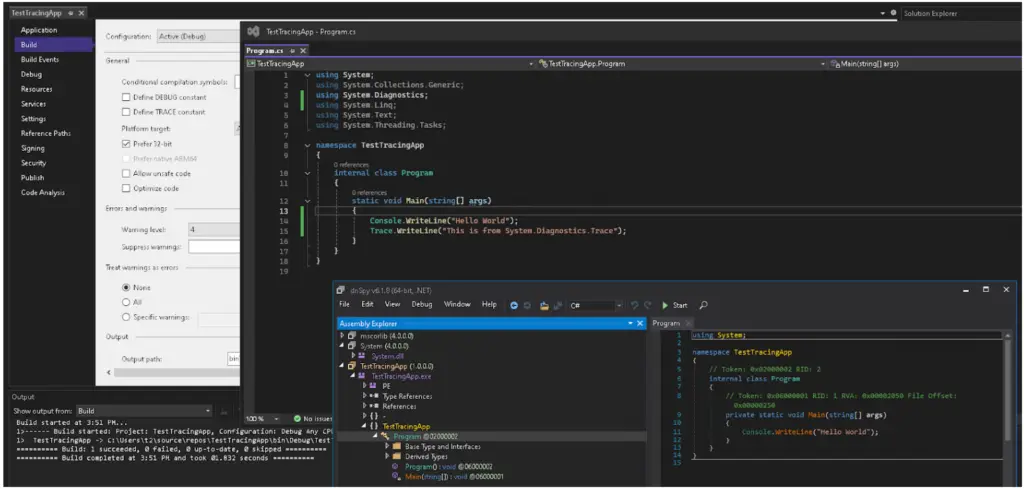
Usage
To control the output of the Trace statements, you can include relevant configuration in the associated application config (.exe.config) file. For example suppose you just want your trace output to be logged to a text file. The following .exe.config snippet can utilise the built-in class System.Diagnostics.TextWriterTraceListener for such a purpose.
<configuration>
<system.diagnostics>
<trace autoflush=”false” indentsize=”4″>
<listeners>
<remove name=”Default” />
<add name=”myListener” type=”System.Diagnostics.TextWriterTraceListener” initializeData=”c:\myListener.log” />
</listeners>
</trace>
</system.diagnostics>
</configuration>
Suppose you want to do something more exotic, like send your trace output to an SQL database or an external API endpoint ? For that, you can provide your own implementation of the abstract System.Diagnostics.TraceListener class [2]. A minimal implementation of this class looks like this:
using System.Diagnostics;
using System.Windows.Forms;
namespace Myspace
{
public class MyTraceListener : TraceListener
{
public MyTraceListener(string name)
{
MessageBox.Show(“Hello from a Custom TraceListener”);
}
public override void Write(string message)
{
}
public override void WriteLine(string message)
{
}
}
}
To use it, compile this class as a Class library called say CustomTraceListener.dll and configure it in your .exe.config file thusly:
<?xml version=“1.0” encoding=“utf-8” ?>
<configuration>
<system.diagnostics>
<trace autoflush=”false” indentsize=”4″>
<listeners>
<remove name=”Default” />
<add name=”myListener” type=”System.Diagnostics.TextWriterTraceListener” initializeData=”c:\myListener.log” />
</listeners>
</trace>
</system.diagnostics> </configuration>
Creating a custom TraceListener for your application is all well and good. But let us now turn our attention on how this can be abused.
If we can find trusted (Authenticode-signed) .NET Framework executables which can load our custom TraceListener at runtime, we can potentially avoid those nasty EDR products which hate unfamiliar and/or unsigned executables. But where will we find such executables ?
Let’s ask AI !
AI! Find me some candidate executables!
This turns out to be the easy part. Give your friendly LLM a prompt such as
Write a Powershell script which parses .NET Framework exe files and finds all exes which call a static method of the System.Diagnostics.Trace class
This should give us a likely set of candidate .exes which should instantiate our custom TraceListener when configured to do so via the.exe.config file. The LLM will dutifully spit out a script and some instructions on how to download necessary dependencies (like Mono.Cecil) to run it.
After running this, your script should spit out some potential candidates such as these:
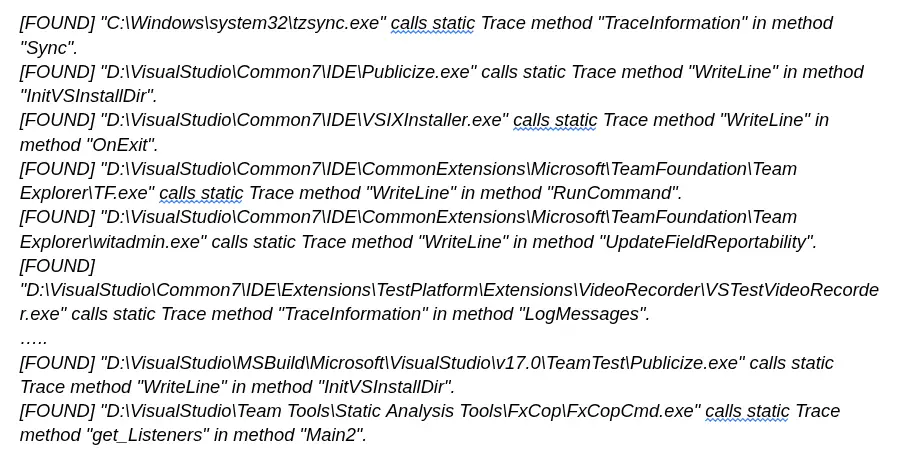
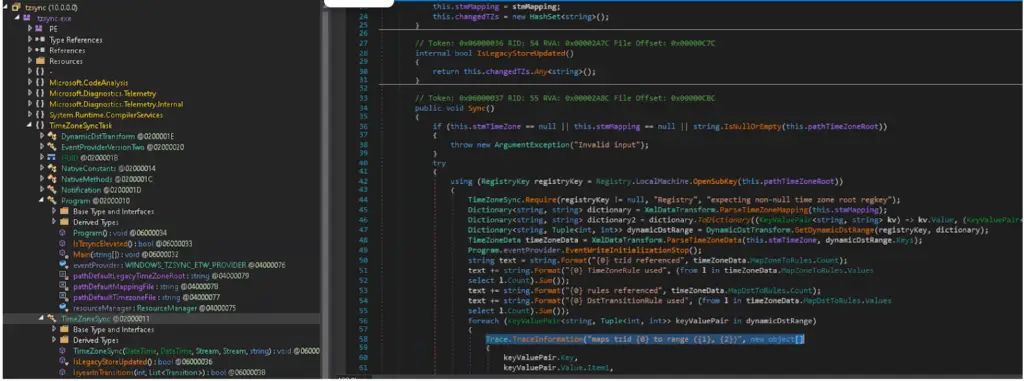
Let’s have a look at the first candidate C:\Windows\system32\tzsync.exe. We can see that this .NET executable does indeed have a class TimeZoneSync with a Sync method which calls the System.Diagnostics.Trace.TraceInformation(string) method:
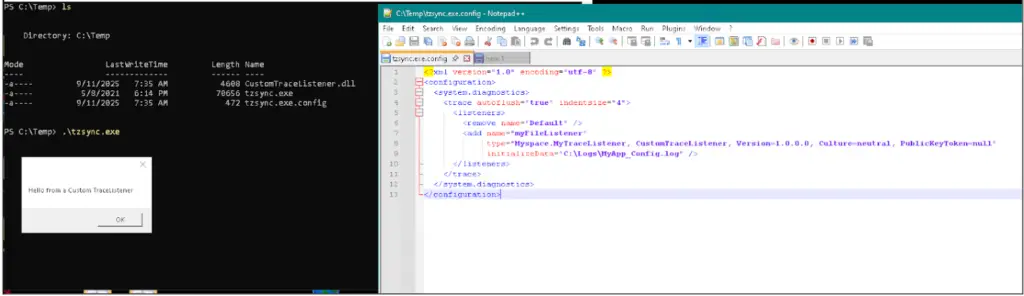
If we place this executable with our custom TraceListener dll in the same directory with the app config file given above we can confirm that when tzsync.exe is executed, the constructor of our custom TraceListener is called:
It's a good start, but...
Ok – this is great! But tzsync.exe is probably not a great candidate for use in offensive operations because
- It’s not Authenticode-signed (for whatever reason).
- Its normal location is in C\:Windows\System32 and many EDR systems will ping you if you run ‘well-known’ executables from non-standard locations.
What about other candidates listed above ? This is where it becomes a bit of trial and error, as many executables have a chain of dependencies which must be called (loaded) before your custom TraceListener is instantiated. This means all of these DLLs must be available on the target endpoint (which typically means you have to get them there alongside the entry-point executable on the target endpoint).
For example, suppose we want to use this executable to invoke our custom TraceListener:
D:\VisualStudio\Common7\IDE\CommonExtensions\Microsoft\TeamFoundation\Team Explorer\TF.exe
If we only have this .exe (and .exe.config) along with our custom .dll in a folder, we run into an error:
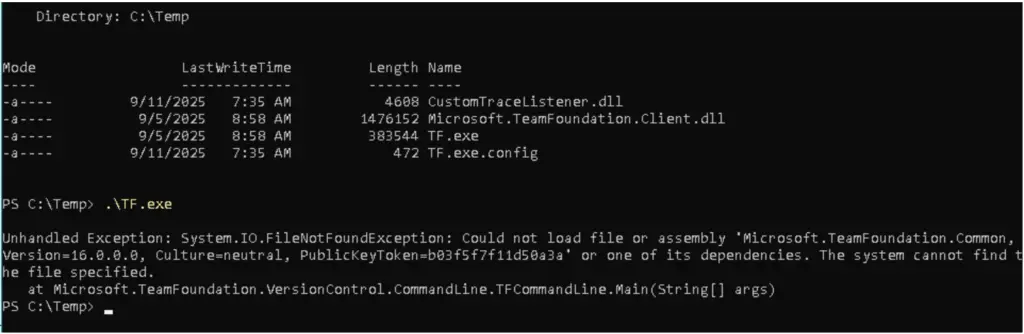
This occurs because, the entry point class TFCommandLine is a subclass of the Microsoft.TeamFoundation.Client.CommandLine.CommandLine class.
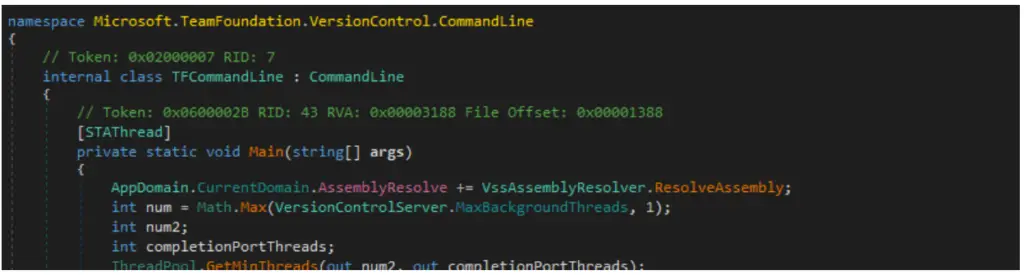
And the Microsoft.TeamFoundation.Client.CommandLine.CommandLine class is itself defined in the Microsoft.TeamFoundation.Client.dll assembly, so this assembly must be available for loading.
Adding this assembly into the directory and trying again we come up with another missing dependency (and so on and so forth).
Eventually you will arrive at a minimal set of dependencies required to load before your custom TraceListener gets instantiated. These must be available (along with your custom DLL) at runtime when you want your TraceListener to execute.
Simpler (with minimal dependencies) Microsoft-signed candidate executables exist from the list above – we leave their discovery as an exercise for the reader!
Remote execution...
Similar to the AppDomainManager injection scenario, custom TraceListener DLLs can be loaded from a remote codebase (instead of locally) by specifying it in the configuration file:
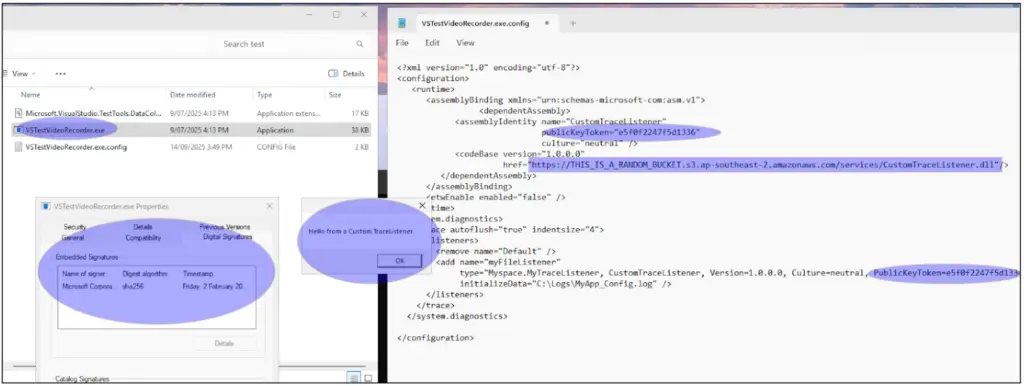
The only requirement is that your remote DLL must be strong-name signed [1], and any signing key will do!
...and A solution
As shown above, certain Microsoft-signed executables can be configured to load custom System.Diagnostics.TraceListener instances via configuration. This is similar to the well-known AppDomainManager injection technique, although it applies to a much smaller pool of signed .NET binaries (c.f. AppDomainManager injection, which applies to all of them). Malicious actors can use this technique to proxy execution of their malware through trusted signed .NET executables.
So now you have some insight into how the baddies work. But we wouldn’t explain all of the above if there were no solution to the problem you now understand.
So what is the risk-management solution? Consider these options:
Application whitelisting
Application whitelisting based on signatures. Similar to other methods of DLL side-loading, the method described above can be blocked using application control technologies such as Application Control for Business (formerly WDAC). A well-designed policy can restrict both executable and DLL loading to code signed by keys associated with trusted enterprise or vendor certificates.
This prevents attackers from introducing unsigned or maliciously signed components into the trusted execution path: even if a Microsoft-signed executable attempts to load a custom TraceListener via a configuration file, the referenced DLL will be denied if it isn’t signed by an approved key. To be effective, the policy should cover both .exe and .dll file types, apply in enforced mode (not audit), and apply to all users including administrators, to avoid trivial bypasses.
WDAC also allows additional rules to handle exceptions (e.g. allowing specific third-party vendors or internal build certificates), but these should be kept tight to minimise the attack surface. While it requires more upfront planning than path-based allowlisting, signature-based control provides strong assurance that only known, trusted code runs, even if an attacker gains write access to a trusted directory.
Whitelisting file-execution paths
Whitelisting file-execution paths. Another effective mitigation is to restrict which directories executables and DLLs can run from. Products like Airlock implement this by enforcing a strict allowlist of approved file paths rather than validating digital signatures. In practice, only binaries residing in these controlled directories (e.g. C:\Program Files\…) are allowed to execute.
This directly disrupts TraceListener-based injection because attackers typically need to drop malicious DLLs and configuration files into user-writable locations such as %AppData%, %ProgramData%, or temporary directories. If execution is only permitted from administrator-controlled paths, the signed host executable cannot be tricked into loading attacker-supplied components from arbitrary locations.
Path-based allowlisting has some operational advantages too: it avoids the complexity of managing certificate trust chains and can be simpler to deploy in environments where code signing is inconsistent. The trade-off is that it requires disciplined change control since defenders must ensure that legitimate applications install into approved paths and that those directories themselves remain locked down.
So what to do next?
In conclusion, the ability of trusted, signed .NET executables to load custom System.Diagnostics.TraceListener DLLs via configuration presents a stealthy vector for “proxied execution” of malware, akin to AppDomainManager injection. Attackers can leverage this to bypass detection by having trusted binaries execute their code.
Is your organization’s defense truly ready for such a compromise?
Building high perimeter walls is a good start, but organisations should also be testing internal resilience. dotSec’s assumed-breach scenarios simulate a threat actor already inside your network, directly challenging your internal detection and containment processes from the ground up.
The security and long-term resilience of your enterprise depend on taking this essential next step.
Contact us today to schedule your next high-impact security assessment.
Premier Australian cyber security specialists
ISO 27001 consulting
Practical and experienced Australian ISO 27001 and ISMS consulting services. We will help you to establish, implement and maintain an effective information security management system (ISMS).
Penetration tests
dotSec’s penetration tests are conducted by experienced, Australian testers who understand real-world attacks and secure-system development. Clear, actionable recommendations, every time.
PCI DSS
dotSec stands out among other PCI DSS companies in Australia: We are not only a PCI QSA company, we are a PCI DSS-compliant service provider so we have first-hand compliance experience.
WAF and app-sec
Web Application Firewalls (WAFs) are critical, protecting web apps and services by inspecting and filtering malicious requests before they reach your servers. Web page or API, a WAF is your first defence.
Identity management
Multi-Factor Authentication (MFA) and Single Sign-On (SSO) reduce password risks, simplify access, letting verified and authorised users reach sensitive systems, services and apps.
Vulnerability management
dotSec provides comprehensive vulnerability management services. As part of this service, we analyse findings in the context of your specific environment, priorities and threat landscape.
Phishing and soc eng
We don’t just test whether users will click a suspicious link — we also run exercises, simulating phishing attacks that are capable of bypassing multi-factor authentication (MFA) protections.
Penetration testing
dotSec’s penetration testing services help you identify and reduce technical security risks across your applications, cloud services and internal networks. Clear, actionable recommendations, every time!
Managed SOC/SIEM
dotSec has provided Australian managed SOC, SIEM and EDR services for 15 years. PCI DSS-compliant and ISO 27001-certified. Advanced log analytics, threat detection and expert investigation services.
Secure configuration
We provide prioritised, practical guidance on how to implement secure configurations properly. Choose from automated deployment via Intune for Windows, Ansible for Linux or Cloud Formation for AWS.
Secure cloud hosting
Secure web hosting is fundamental to protecting online assets and customer data. We have over a decade of AWS experience providing highly secure, scalable, and reliable cloud infrastructure.
Essential eight
dotSec helps organisations to benefit from the ACSC Essential Eight by assessing maturity levels, applying practical security controls, assessing compliance, and improving resilience against attacks.
CIS 18 Critical Controls
Evaluation against the CIS 18 Controls establishes a clear baseline for stakeholders, supporting evidence-based planning, budgeting, maturity-improvement and compliance decisions
Advisory services
We have over 25 years of cyber security experience, providing practical risk-based guidance, advisory and CISO services to a wide range of public and private organisations across Australia.