Phishing and fiction: The human is not the control
Introduction
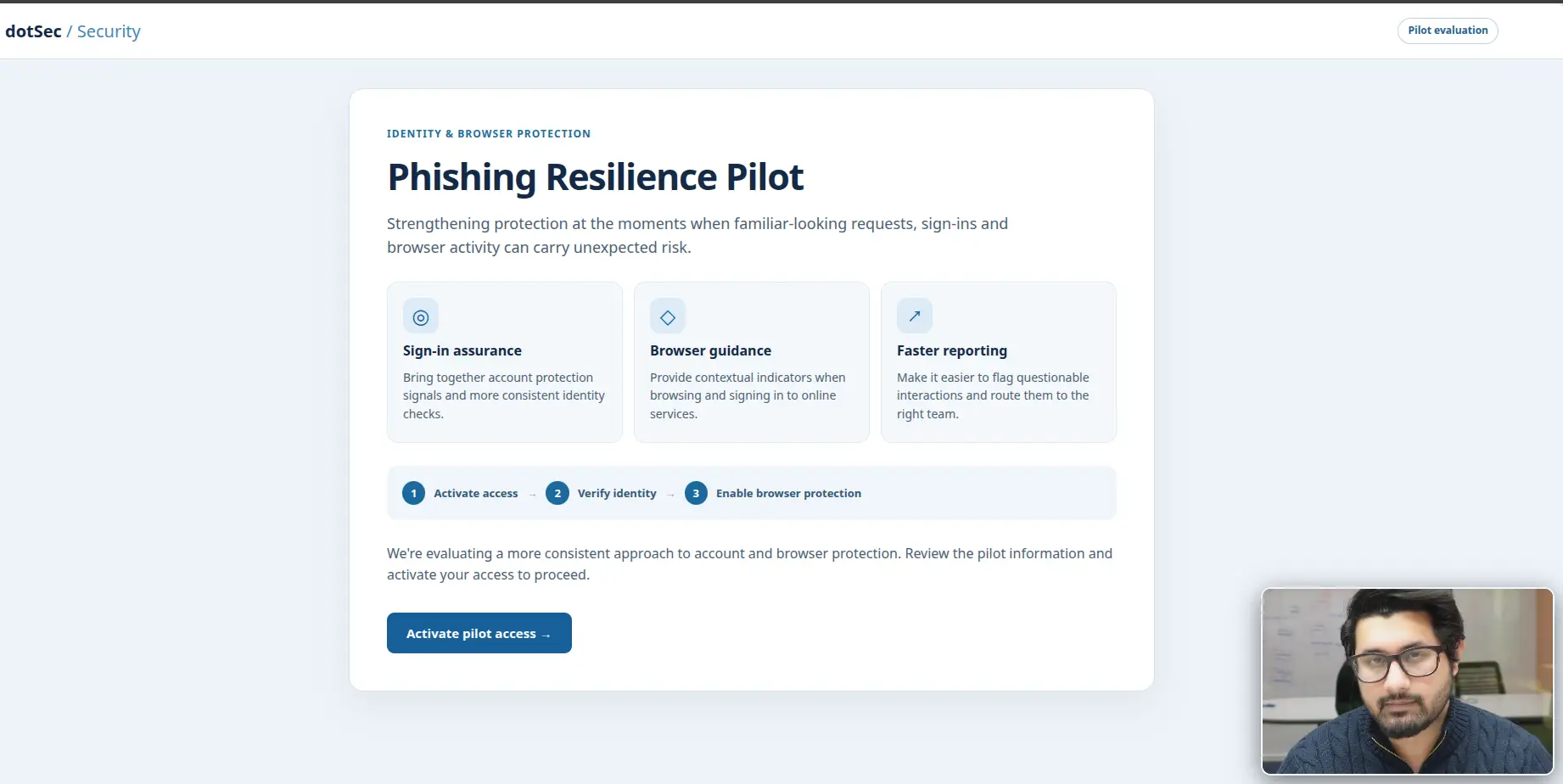
At a recent on-line presentation, we introduced the audience to a new colleague. The colleague talked about how he’s been the victim of a phishing incident from the previous month, explained a new browser-based anti-phishing initiative, and then walked everyone through how to download and install the anti-phishing browser plugin: He provided (on the video call) a link to an internal site, a sign-in with work credentials, an MFA prompt and, finally, a request to approve a browser extension’s permissions. All very sensible, and all very familiar.
But the colleague wasn’t real! The person was AI-generated, the site and the sign-in page were built to demonstrate a phishing exercise, including the (simulated in this case) collection of credentials and an authenticator code. It was a bit clunky and some people saw through it but we only spent about ten hours (mostly figuring out the mechanics of the avatar API) and A$100 to put together. An attacker with more money, more skill and more knowledge of your organisation would do a lot better.
We could interact and converse with the AI-generated ‘colleague’ and so the flow was quite natural: A presenter introduced the colleague, the colleague recommended the site, the sign-in page looked like every other sign-in page, and the “malicious” extension was pitched as a security improvement. No part of the session event attempted to establish that the authentication and download requests were legitimate or authorised; it just flowed like a normal video conference and by the end of the presentation, the “colleague” had captured (fake) credentials and coordinated the installation of a (fake) malicious browser add-on.
Back in January, we wrote about why your staff click spelling mistake-laden emails [1], and argued that you can’t train your way out of human nature; instead, you engineer the environment so that the click doesn’t result in utter carnage. This post picks up where that one left off. Since then, Microsoft has made passkeys the default sign-in experience in Entra ID (from 1 September 2026) and is retiring its own SMS and voice MFA from February 2027 [2]. That’s good news, so what are attackers doing about it, and what happens when the phish works anyway?
If you only want the short answer: Awareness is everyone’s responsibility, but resilience is the organisation’s. The rest of this post is the detail.
Phishing phails - just a few examples
Here are just a couple of phishing examples that have hit the news recently. We know, for certain, that there are other incidents that have not yet been reported:
- RMS Cloud Third-Party Booking Breach (October 2026): A global cyber security incident hit RMS Cloud, a booking platform used by more than 6,000 campgrounds, hotels, and holiday parks worldwide (including Australian operators like Reflections Holidays and Discovery Parks). Attackers used stolen guest booking details to send targeted phishing emails, WhatsApp messages, and SMS alerts claiming a payment had failed, tricking recipients into handing over credit card information.
- Anthropic Impersonation Phishing Campaign (September–October 2026): Attackers launched a global phishing campaign impersonating Anthropic, offering fake early access to AI technology to harvest Google and Microsoft account credentials. Despite using basic tactics like shortened URLs and CAPTCHAs, the emails bypassed top secure email gateway (SEG) products.
- Hedge Fund Voice-Phishing Schemes (August 2026): Major U.S. hedge funds (including Citadel and Point72) faced cyberattacks where threat actors used voice-phishing (vishing) by impersonating company help-desk staff over the phone to manipulate employees into surrendering authentication credentials.
What the attacker is actually after
Phishing still gets talked about as password theft, but these days the password is often the least interesting thing an attacker walks away with. A successful phish can deliver any of the following:
- an authenticated session, which works without the password or the MFA that protected it;
- the authority to act as a real user in email, chat and document platforms;
- an OAuth grant, which gives an attacker’s application ongoing access to an account’s data;
- code execution on the endpoint; or
- developer credentials, publishing rights and access to build pipelines.
The value of the heist depends largely on whose identity is targeted. A routine account exposes correspondence and documents; a finance account supports invoice fraud and payment diversion; a developer account can change source code or the software packages that other organisations install; and an administrator account can change the security configuration itself.
So phishing risk has two parts: How likely is it that someone is deceived, and what are the consequences once the attacker has whatever they wanted? Focusing on humans with things like awareness training works on the first part, but it does very little to help with the second, which is where the three incidents below come in.
Mirage2FA and session theft
In August, the threat intelligence team at ANY.RUN published its analysis of Mirage2FA [3], a phishing-as-a-service kit used to take over Microsoft 365 accounts. It’s a useful illustration of why “we have MFA” isn’t the end of the conversation.
In this scenario, the victim receives an email carrying an .htm, .xhtml or .svg attachment, or a QR code, with HR and benefits updates among the recurring lures. Opening the attachment runs JavaScript in the browser, which fetches the rest of the kit and presents a fake Microsoft 365 login page backed by a reverse proxy. The victim types in their username, password and one-time code, and the proxy relays all three attributes to the real Microsoft service in real time. Microsoft checks them, finds them valid (because they are), and issues a session cookie… which the attacker’s proxy keeps.
From Microsoft’s side, everything worked exactly as designed: The credentials were correct, the code was correct, and authentication succeeded. The attacker then replays the stolen cookie to read email and act as the user, without needing the password or MFA again. Session cookie theft was the most common outcome in ANY.RUN’s dataset, ahead of password and one-time-code capture, although ANY.RUN is careful to describe its victim figures as estimates of potential impact rather than confirmed compromises [3].
Two things are worth taking away from this one.
First, this is exactly the attack that phishing-resistant authentication defeats. As we explained in January, a FIDO2 passkey or Windows Hello for Business includes the domain the browser is actually on in its signed response, so a proxy on a look-alike domain gets a response that the real service rejects [1]. No valid sign-in means no session cookie to steal.
Second, if the victim is not using phishing-resistant MFA and the attacker does get hold of a session cookie, resetting the user’s password won’t evict them. In the case of a successful attack such as this, ANY.RUN’s guidance is to revoke all active sessions and tokens, review mail-forwarding rules and OAuth grants, and investigate what was done with the identity [3]. That of course will require being able to know what happened by reviewing the log events that have been collected and indexed by your SIEM. And if your incident response playbook stops at “reset the password”, it needs another couple of lines.
ClickFix and fake CAPTCHAs
Not every phish is after a login. ClickFix campaigns are after the endpoint, and they get there by impersonating a security procedure rather than defeating one; our bogus colleague and his dodgy browser-plugin are an example of this kind of attack.
In this scenario, the victim arrives at a page (usually via a poisoned search result, although email, social media and in-app ads are also used) that looks like a routine “verify you are human” check. Rather than ticking a box, the visitor is told to paste something into a command window and run it. The page has already put a malicious command on the clipboard, so what the victim pastes and runs, results in the installation of malware. Malwarebytes has tracked these campaigns delivering the Lumma Stealer information stealer to Windows users and Atomic Stealer to Mac users [4].
The latest versions are almost a lesson in customer service! According to Malwarebytes, the pages now detect the visitor’s operating system, copy the right command for it, add a countdown timer to hurry things along, and embed a tutorial video showing the victim how to infect their own machine [4].
Awareness can help here, because there’s a simple rule to teach: No legitimate website verification ever needs you to run a command. But the control that decides the outcome for certain is the control that determines whether that command runs at all. Application control (allowing only approved software to execute from approved locaions) stops the payload no matter how persuasive the page was.
There’s also a link back to Mirage2FA. Information stealers are built to collect browser data, including cookies [9], and Microsoft’s incident responders have described attackers replaying a stolen browser cookie to skip a sign-in that has already completed MFA [10]. A passkey protects the sign-in, not the session that follows it, so a stealer on the endpoint can still take what a legitimate, phishing-resistant sign-in produced. Microsoft’s Token Protection binds sign-in session tokens to the device, but at the time of writing it supports native applications only, not browser-based ones [5].
In summary, authentication security and session security are related, but they’re two separate problems, and passkeys solve only the first.
GhostAction and OAuth device flow
Awareness training usually tells people to read permission requests carefully before they approve them. GhostAction shows what happens when there’s no request to read.
In October, OpenSourceMalware documented a phishing campaign aimed at open-source software maintainers [6]. The email impersonated a GitHub security alert, addressed the recipient by their real name, and warned of a new sign-in to their account from Moscow. (The IP address it quoted is actually registered to a Bulgarian broadband provider, but specific technical detail makes a lure credible whether or not it’s accurate and correct.) The “Secure my account” button led to a look-alike domain running a reverse proxy that in turn connected to GitHub, and that proxy collected the victim’s password and authenticator code.
But that’s not the end of it and the recovered page source shows the kit was built to do more than that. Once the victim was signed in through the proxy, injected JavaScript was designed to start a GitHub OAuth device-flow authorisation requesting the repo, workflow and read:org scopes, fill in the device code itself, and submit the approval through the victim’s own session [6]. The victim would never see a consent screen, type a code or knowingly approve anything. Those scopes give broad access to repositories and the ability to change GitHub Actions workflow files, which is how the wider campaign had been planting malicious workflows to harvest CI/CD secrets [6].
The same write-up also has a better ending. In one case, the researchers worked with a targeted maintainer in real time: The attacker logged in successfully with the phished credentials, but an additional MFA challenge stopped them escalating privileges, and the account was not compromised [6]. The phish succeeded, but the organisational controls reduced (to zero in this case) the consequences.
Developer accounts deserve particular attention because the consequence of their compromise can quickly spread to all users of the software that the developer can access and maintain. Last year’s Shai-Hulud worm spread through the npm ecosystem via compromised maintainer accounts, injecting malicious scripts into popular packages, and GitHub removed more than 500 compromised packages in response [7]. GitHub’s announced fixes are instructive in themselves: FIDO-based 2FA in place of TOTP codes, short-lived granular tokens, and trusted publishing so that long-lived tokens aren’t sitting in build systems at all [7].
None of the controls here are user decisions. OAuth device-flow abuse is contained, not by user training and response, but by organisation policy that describes which applications can be authorised and which can reach organisational data. Developer access is contained by separating development and administrative identities, keeping secrets off workstations, issuing narrowly scoped, short-lived credentials, and requiring independent approval for sensitive repository and release operations.
Account recovery
There’s one more way around strong authentication, and that is to ignore the authentication protocol all together!
Passkeys get lost along with the phones and laptops they live on, so every organisation needs a way to restore access. In Microsoft Entra ID, for example, an administrator can issue a Temporary Access Pass, a time-limited passcode the user signs in with to register a new passwordless method; Microsoft notes that it also makes recovery easier when a user loses a strong authentication method [8]. That’s a sensible feature. But if an attacker can impersonate an employee convincingly enough to persuade the helpdesk to issue one, the strength of the original passkey is irrelevant: The attacker has targeted the recovery process, not the sign-in.
Remember the synthetic colleague that could converse confidently about dotSec and their (bogus) phishing experience? A helpdesk that verifies callers by how they look or sound, or by whether they seem familiar, is relying on the signals a synthetic colleague is built to imitate. So the identity lifecycle needs attention from end to end: Enrolment, sign-in, the active session, loss, recovery and revocation. In practice that means helpdesk identity verification that doesn’t rest on how someone looks or sounds, tighter recovery for privileged accounts, notification whenever a new authenticator is registered, and auditing of recovery activity.
So what is the employee's job?
Employees do have a part to play:
- verify unusual or consequential requests through a separately established channel, however familiar the name, voice, face or website;
- report unexpected MFA prompts rather than approving them to make them go away;
- treat any website that asks for a command to be run as hostile;
- question permission requests (when there is one to question);
- keep everyday work off administrative accounts; and
- report anything suspicious, early.
But that’s it, because training and awareness won’t catch every attack, especially ones that are crafted by clever attackers using AI tools.
And the organisation?
The organisation owns everything else. It is responsible for all the policies, and for the mechanisms and process that implement the required controls:
- phishing-resistant authentication (FIDO2 passkeys or Windows Hello for Business), which defeats Mirage2FA-style relay;
- session protection, sensible session lifetimes, and an incident response playbook that revokes sessions and tokens, not just passwords;
- application control and managed browser-extension policy, which stop ClickFix payloads and unapproved extensions regardless of how persuasive the page was;
- OAuth governance, so that a user can’t hand an application broad access to organisational data;
- least privilege, separate administrative and development identities, and secrets kept out of plaintext and off workstations;
- account recovery that resists impersonation; and
- monitoring, plus a tested ability to contain an incident when prevention fails.
And as our three opening examples show, this is becoming business-critical. AI makes the lures cheaper and better and as ASD’s most recent Annual Cyber Threat Report notes, AI almost certainly enables malicious actors to attack at a larger scale and a faster rate [9]. And, as we’ve demonstrated cheaply, the AI assisted attacks are becoming much harder (soon, probably impossible) for a human to spot.
How dotSec can help
As we said in January, we don’t just sell you a licence and wish you luck. For this problem specifically, we can:
- run phishing and social engineering simulations, including adversary-in-the-middle simulations that show which accounts are exposed even with standard MFA in place;
- deploy and manage phishing-resistant authentication, including Windows Hello for Business and the Entra ID conditional access policies around it;
- assess and uplift application control and the rest of the Essential Eight;
- detect suspicious sign-in and session activity through our managed SOC and SIEM; and
- run tabletop exercises that test whether your response to a stolen session actually ends with the attacker locked out.
The bottom line
The goal isn’t a workforce that never makes a mistake. No such workforce exists, and trying to build one will probably produce staff who are too nervous to open their email and do their real job. Rather than engineer a panic-induced, internal denial-of-service attack, the organisation’s job is to take a proactive approach and implement organisational controls listed above: Things like complete policies and procedures, phishing-resistant MFA, application whitelisting, ZTNA and CASB, testing and assessment exercises, and monitored SIEM/SOC. According to a prioritised risk register that references known and well-accepted frameworks and standards, of course.
And when a phish does succeed, the business will not be focused on whether or not the employee missed something. Instead, because the business is prepared and has its organisational policies, procedures and mechanisms in place, it will be able to quickly answer more important questions like: Did the attacker get anything and if so, what and why was it available? What stopped the attacker at each step, or allowed it? What detected the attack, and how quickly could it be contained?
Every one of those questions points at a design decision rather than at someone’s vigilance, and every one of them has an answer you can engineer.
Awareness is everyone’s responsibility. Resilience is the organisation’s.
References
- dotSec, “Why your staff click spelling mistake-laden emails (and how to actually stop them),” 27 January 2026.
- Microsoft Learn, “Passkeys by default and retirement of Microsoft-provided SMS and voice authentication,” last updated 23 September 2026.
- ANY.RUN, “Mirage2FA Hijacks Companies’ Microsoft 365 Sessions, with Over 4K Victims in the US,” 18 August 2026.
- Malwarebytes, “Fake CAPTCHA sites now have tutorial videos to help victims install malware,” 7 November 2025.
- Microsoft Learn, “Token Protection Deployment Guide – Windows,” last updated 21 September 2026.
- OpenSourceMalware, “GhostAction Is Now Phishing Open Source Maintainers,” 11 October 2026.
- GitHub, “Our plan for a more secure npm supply chain,” 22 September 2025.
- Microsoft Learn, “Configure Temporary Access Pass to register passwordless authentication methods,” last updated 4 March 2026.
- Australian Signals Directorate, “Annual Cyber Threat Report 2024-25,” 14 October 2025.
- Microsoft Security, “Token tactics: How to prevent, detect, and respond to cloud token theft,” 16 November 2022.
Premier Australian cyber security specialists
team certifications